The students at my school recently asked me to write an article on the difference between twitter and facebook for their monthly publication known as "Counterpoint Monthly." They are still working solely in the print world, so I'm reposting here so students and anyone else may leave comments.
Quiz - what do Iranian citizen journalists and famous people like Governor Arnold Schwarzenegger, Mr. Taffee and Paris Hilton all have in common? Answer - they all use Twitter, one of the fastest growing social networks on the Internet. I was asked by the CP Monthly Team to write an article on the differences between two of the most popular social networks right now, Twitter and Facebook. This is an often discussed topic in the blogosphere with a host of well written blog posts that address the main similarities and differences. Danah Boyd, who is a social media researcher for Microsoft, recently wrote a stellar post over at her blog that addresses this question. You may access Dr. Boyd's piece at http://bit.ly/1185Pd. Given Boyd's excellent article and the fact that many of you are already avid Facebook users, I thought I would focus my 600 words on Twitter. I certainly don't intend for this to be a sales pitch on why you should use Twitter because it isn't without fault and it isn't for everyone. Instead, I'd like to simply share a few stories of how Twitter has been used by people around the world and how I use it to connect with others who share my passions and interests.
Out of the box, Twitter might seem like it is nothing more than a platform for blabbering about our mundane daily occurrences. While I've seen some of this in my experience over the past two years using Twitter, I've also witnessed some incredibly powerful stories of collaboration, sharing and creativity. For example, Southern California residents used the platform earlier this fall to share information about the Loma wildfires. Consider what happened this past June with the reporting of the protests following Iran's hotly contested election. The government of Iran effectively shut down all modern media outlets and journalists. The traditional way of reporting the news was completely closed. Iranian citizens, however, armed with Twitter, mobile phones, extraordinary willpower and creativity, Tweeted the news of their struggle. In a show of solidarity and as a means to confuse the government, people outside of Iran turned their profile pictures to the color of the opposition party (green) and changed their location to Tehran, Iran. As the government blocked Twitter access inside of the country, people inside and outside of Iran worked together to create proxy sites that circumvented the governmental filtering. The government eventually blocked these proxies, but new ones were built and shared so that the news reporting would continue via Twitter. The US State Department even asked Twitter to delay a planned network maintenance outage so that the citizen journalists inside of Iran could continue their work without interruption. This was an incredible story of global collaboration! It is hard to believe that all of this was facilitated by a small little company from San Francisco that built a software platform around the single simple question of, "What are you doing right now?"
Who do I connect with on Twitter? I primarily use Twitter as a way to collaborate and share with other teachers around the world who are interested in the intersection of technology and learning. We share links to interesting blog posts and ideas about clever teaching ideas. The concept of the the Gator Radio Experience project here at Castilleja is the direct result of my Twitter interactions with other educators. Many of these educators know a great deal more than I about the world of live Internet webcasting and were incredibly helpful in helping us launch this project. I also follow university professors, a few authors, individuals and organizations with a green slant, and of course the University of Wisconsin - Madison's mascot, Bucky Badger!
Before creating a Twitter account or an account on any other social media platform, please talk things over with your parents. I highly recommend that you have a conversation with your parents in which you agree upon acceptable and unacceptable uses of social networks. While these tools may be used in incredibly productive and meaningful ways, they certainly can come back to create problems for us in the future. Also, please know that Twitter and all other social networking sites have a minimum age requirement in their terms of service. This minimum age tends to be 13 years old and should be respected. Finally, remember the Golden Rule as you work, share and collaborate in these powerful online communities.
If you'd like to leave comments about this story or if you'd like to see additional resources and information about Twitter, visit my professional blog at http://bit.ly/mjmontagne.
Twitter Streams of Interest:
PeaceDot Project: http://twitter.com/peacedot
Gator Radio Experience: http://twitter.com/gator_radio
Bucky Badger: http://twitter.com/buckybadger
Mr. Montagne's Twitter Stream: http://twitter.com/mjmontagne
Thoughts and reflections on the world of educational technology...oh, and a few other things
Showing posts with label twitter. Show all posts
Wednesday, November 11, 2009
Monday, September 14, 2009
Yammer - an experiment in organizational micro-blogging
What is Yammer and why might it be useful?
Yammer is essentially a private mircoblogging platform for organizations. Posts are not limited to 140 characters like in Twitter and may include text, images, links, etc. Yammer offers a decent desktop client and the iPhone App is pretty decent (soon the iPhone app will include photo sharing from the iPhone camera, which will make a great on-the-fly classroom sharing tool). Groups inside of the network may be created and Yammer supports threaded conversation, which is something that Twitter does not offer. In comparison to email, I believe it has the potential to be a much more effective space to share information across traditional organizational boundaries. For years I've found email to be too linear and one dimensional and I think many folks share my thinking. In email I've found that many folks typically do not share with the entire organization, but instead only with their department or mail group. As we consider multi-disciplinary learning opportunities in our schools, we're going to have to look at using communication systems that move us away from 'island' communication. After all, there is a very good chance that the math link or teaching idea that a math teachers shares with other members of her department department could have relevance to a much broader audience that even includes students.
My experience in setting up the network for our organization:
The first step involved my going over to Yammer and creating my account. I had to so with my Castilleja email address as the registration system is dependent upon email verification. Once I verified that I indeed owned that email address, I was in the network and Yammering. After getting into the space I invited a few of my colleagues in the tech department and a couple of faculty members. Initially traffic was pretty light, but eventually invited some other colleauges who invited others, etc. After about a week or so I posted a notice to our faculty & staff distribution list and I eventually sent an invitation to a few students who work on our radio show project and also to my advisees.
Our Progress in Yammer:
We currently have nearly 30 faculty, staff and students in the network and my guess is that we average around 5 posts a day. This isn't very many posts, but in comparison to the kinds of email posts we see going to our faculty & staff distribution list, it has potential to be an excellent platform to discuss teaching and learning. The vast majority of emails to our faculty/staff distribution lists are operational in nature while the 5-10 daily posts at Yammer have some relevance to learning. I'm not convinced entirely that Yammer will work for us, but it certainly should be an interesting experiment.
If cross departmental, multi-constituent (eg-teachers, students, staff, administration), and open sharing regarding teaching and learning isn't happening in your school's email system, then where is it happening??
I'm including a few of our recent Yammer posts so you have an idea of what some of our folks are sharing (I won't reveal the identities of those posting)...while these posts aren't earth shattering, I'm convinced that this type of sharing is really important. After all, the ideas of an organization's employees are quite possibly its most valuable asset.
"the library has obtained a KINDLE for the casti community to experiment with. loading new content. any requests?"
"Kristin sent me a link to a great blog, Letters of Note http://www.lettersofnote.com/ which posts interesting and historical letters (with transcripts)."
From "Red Scarf Girl" to WorldBook Online, check out English 6 students engaged in a lesson: http://library.castilleja.org
"Just watched the ISS and Discovery pass overhead, and so can you! Palo Alto viewing times for the next few days can be found here: http://tinyurl.com/ny83me On Tuesday and Wednesday the space shuttle Discovery will appear a few minutes ahead of the ISS, along the same path. Lower magnitudes are brighter, so Tuesday evening's pass should be quite bright, even though the sky won't be fully dark yet."
"i am trying to cultivate a habit of searching youtube for interviews with Latin American authors and other juicy tidbits for my classes."
"I just watched Dan Pink talk on TED. Great recommendation Matt. Great talk and quite appropriate for our mindsets discussion. TED never fail to amaze me. Make sure to check it out at TED.Com"
Thursday, November 06, 2008
The Impact of Election Technology on K12
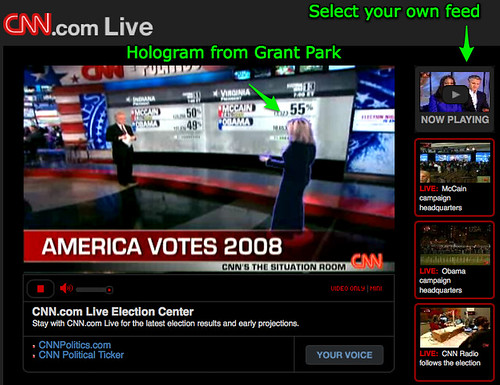
I also really enjoyed CNN's multiple streams in their online coverage. I loved having the option to toggle between different feeds...it just seemed to add to the excitement in a way that static/traditional TV can't do.
The other media avenue that I fully enjoyed participating in was Twitter. I was completely glued to the Twitterstream...I follow people from all over the world and it was so interesting to get this first person, "boots on the ground" perspective that simply is not possible through the traditional television media. I absolutely loved the social nature of the experience, with twitterpals from all over the place sharing their take on the historic day. Again, the edtech geek in me thought about the possibilities associated with this form of media in the classroom. Twitter is a fantastic platform for building a network and for "making friends all over the world," which is something that Alan November thinks we should be teaching our kids to do (and I happen to agree with him). Once you have a "boots on the ground" network of people all across the globe, the possibilities for authentic learning becomes nearly limitless.
Friday, April 04, 2008
Would you let your child(ren) spend as much time on the computer as you spend on it?
This was a twitterpoll sent out this morning by Brian Grenier, and my initial response was as follows:
I'll attempt to clarify my thinking (I can't promise that I'll do a very good job of it here either!!)
Brian's initial question in twitter, "Would you let your child(ren) spend as much time on the computer as you spend on it?" simply triggered something that I've been thinking for quite some time now.
Imagine if adults were forced to work with mostly analogue tools and limited access to digital tools during the work day much like students are required to do during their work day. Now imagine those adults going home and having better access to digital resources and connectivity to digital resources than they do during the work day (much like many of our students).
Why don't students have connectivity during the school day? Why should they mostly be limited to analogue tools with occasional computer lab access? Imagine if adults were forced to work with analogue tools all day with periodic access to digital resources in some centralized computer lab environment in their work place.
Anyway, this is somewhat tangential to Brian's original question, and my analogy might be somewhat flawed, but I believe students should have solid access to digital resources in the 21st century just like they had solid access to anaglogue resources in the 20th century.
Karl Fisch wrote a wonderful post on, "Why Wireless," which discusses the value of a publicly accessible WiFi node on his campus.
Over-and-out...
Gr8 question-this is my point to teachers who want to block/limit student access during the school dayTo which Brian replied,
I'm missing the point, can you elaborate?To which I replied,
ahh, the limitations of 140 characters...I'll elaborate on my blog or some other public space and send to youTwitter can definitely be a source of confusion when getting involved in back and forth discussions. Many times we lose the meaning in emails, which aren't bound by a 140 character restriction. So twitter can definitely be problemmatic in discussions.
I'll attempt to clarify my thinking (I can't promise that I'll do a very good job of it here either!!)
Brian's initial question in twitter, "Would you let your child(ren) spend as much time on the computer as you spend on it?" simply triggered something that I've been thinking for quite some time now.
Imagine if adults were forced to work with mostly analogue tools and limited access to digital tools during the work day much like students are required to do during their work day. Now imagine those adults going home and having better access to digital resources and connectivity to digital resources than they do during the work day (much like many of our students).
Why don't students have connectivity during the school day? Why should they mostly be limited to analogue tools with occasional computer lab access? Imagine if adults were forced to work with analogue tools all day with periodic access to digital resources in some centralized computer lab environment in their work place.
Anyway, this is somewhat tangential to Brian's original question, and my analogy might be somewhat flawed, but I believe students should have solid access to digital resources in the 21st century just like they had solid access to anaglogue resources in the 20th century.
Karl Fisch wrote a wonderful post on, "Why Wireless," which discusses the value of a publicly accessible WiFi node on his campus.
Over-and-out...
Thursday, March 13, 2008
Alverno College Pre-Service Teacher Meeting
I had the good fortune and privilege to speak with 16 pre-service teachers in Alverno College's teacher pre-service teacher program this morning. Pat Walsh, who is taking over as the facilitator of this class titled, "Technology in Education," called me 1 week ago asking if I'd be willing to host a class session on our campus. Pat's colleague who started out at the instructor was unable to continue due to health complications. I said I would be happy to host the class and I also thought up an activity to have the students participate in prior to our visit today. After hanging up with Pat, I called her back and suggested that her students watch Sir Ken Robinson's wonderful TED Talk titled, "Do Schools Kill Creativity?" Students watched the 20 minute clip and then reflected on the video and introduced themselves to me in the form of a text comment on a Voicethread that I emailed over to Pat. You can click here to meet these wonderful students!I really enjoyed our time today. I most likely spoke way to much and threw too many ideas and concepts at them, but this was the first time that I've ever met with a group of pre-service teachers and I wanted to show them as many possibilities as our short amount of time would allow. We started out our meeting with a visit from my colleague and peer down at Plano Middle School, Scott Meech. It was nice of Scott to take time away from his busy day today to speak with us about some of the things we've been up to in our Protecht project. We talked about how we use some of these tools to collaborate and work with one another even though we're scattered all across the country. Scott brought up the concept of the "back channel" which was something unfamiliar to this group. Vicki Davis, the "Cool Cat Teacher" from Camilla, Georgia, wrote an interesting blog post on using a back channel with students. We did have one of the students talk about how she uses SMS messaging on her cell to back channel and talk with other students in class. This was interesting, as I've read quite bit about cell phones as instructional tools this year. Anyway, it was great to bring Scott into the mix as he always brings up interesting points that make you think and I'm glad the students were introduced to Skype as a way to invite remote guests into a classroom environment.
After our talk with Scott, we took a look at Karl Fisch's "Did You Know Video" and followed this up with a brief discussion. I've used this video this year with parents, teachers and now pre-service teachers. It is such a great piece to frame any discussion on what it means to teach and learn in the 21st century.
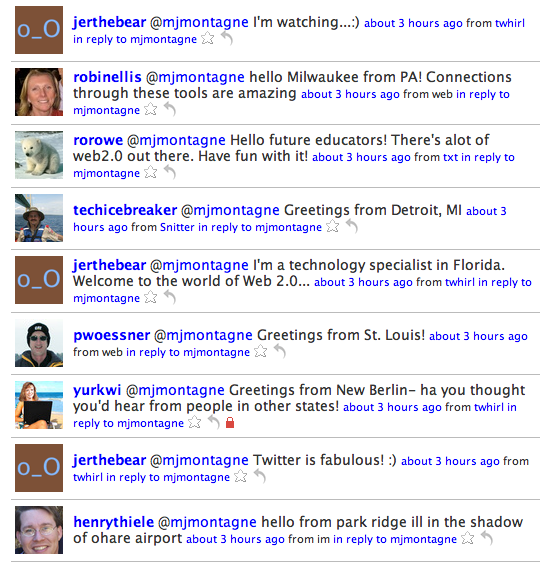
After our Skype conversation with Scott we fired up Ustream and broadcast our session. I twittered out the ustream URL and we had 3 or 4 other folks tune in (thanks to jepcke, jerthebear, and plennig for joining in the conversation via the chat box in ustream-I'm sorry I wasn't able to check the chat box...for those of you who would like to see the chat transcript, click here). I also sent out a Twitter post asking some of my twitter buddies to say hello. I think the impact of twitter, Ustream and Scott's visit via Skype really had an impact on this group. We received hello messages from my Twitterbuddies all over the world, which was pretty powerful for them to see. I took three screenshots of the Twitter replies to our group... these are posted online: Screenshot 1, screenshot 2, screenshot 3.
I was quite impressed with this group-I think they're going to take some of these ideas and concepts and run for miles and miles. Many of them are already using Facebook and tools with similar features and capabilities. I hope that they can tweak things a bit and customize the way they use these tools so they can be leveraged as instructional assets in their classrooms (or "studios" and "global communications centers" as we talked about!)
As promised, I told Pat that I would provide a link to the list of "Emerging Technologies" that Ryan Bretag twittered out last night (talk about just in time professional exchanges!) You may find this document online by clicking here. I'm fairly certain that this document was created collaboratively by folks in Ryan's professional learning network (PLNs-for more on PLNs, check out Vinnie Vrotny's K12 Online conference session on PLNs from last fall).
Today we also talked about productivity tools in comparison to creativity tools. To me, the tools that we talked about today are ones that promote and foster creativity. Here are the tools that I currently use most often to collaborate, communicate, learn, create, and engage in professional development:
- Skype
- Voicethread
- Google Docs-Watch the "Google Docs in Plain English" video on YouTube*
- Blogger.com
- Delicious Social Bookmarking
- Wikispaces
- Ustream.TV
- RSS (I really wanted to touch on RSS and Google Reader more today, but I just ran out of time. RSS and Google Reader are two tools that allow you to effectively manage and sift through all of the streams/information that you subscribe to)
- Google Reader
- Flickr Online Photo Sharing
- Classroom 2.0 - Professional networking community for teachers. Has a similar look and feel to other social networking platforms. This is a wonderful way to share, exchange, and meet other educators from all over the world.
The recorded conversation and slides from today's meeting with the Alverno students is embedded below. At some point I'll edit down the recorded audio and post that here as well.
*Photo courtesy of a user on flickr who gave me explicit permission to use this photo for educational purposes (name is not mentioned because it isn't "K12 friendly")
Sunday, December 30, 2007
Top Videos from 2007
I was inspired by a recent Tweet to a blogger's post on her Top 10 Education Related videos for the year. I do apologize for not referencing the blogger and the post, but I can't seem to find the URL and my twitter time line only keeps track of a limited history. I will revise this post if I can dig up the link. Anyhow, here are my top 5 education-related videos from the past year.
#1: Karl Fisch's Did You Know 2.0
We've shared this video in our faculty web 2.0 study group and with a group of middle school parents at a recent parent education meeting. It triggered interesting conversation with both groups. Simply an outstanding piece that really makes you think...
#2: All Things Commoncraft!
These short videos have been extremely helpful in explaining web 2.0 technologies to folks who are new to blogs, wikis and like technologies. Lee Lee Lefever has the ability to break down and explain some relatively tricky concepts in a very simple manner. Below you'll find the Commoncraft video that gives an overview of Google Docs:
#3: One Laptop Per Child Program's Give One Get One Campaign:
I think the One Laptop Per Child program is one of the most revolutionary concepts/ideas of the 21st century. Creating the conduit for children all over the world to connect with information and other people will change things dramatically. Of course this change will not happen over night, but it will happen. I'm also excited because I'm the proud new owner of an XO laptop myself!
#4: Elementary School Student Art Reflections via/ Voicethread:
Voicethread is a very easy to use multimedia publishing application that fosters collaboration and communication. I've seen many interesting student project in voicethread over the past few months, but the one I'm embedding below is from a group of young elementary students at a school in Texas (thanks to Brian Grenier for posting this via twitter). It provides a nice sample of the effective use of voicethread for student publishing and project reflection.
#5: Inside of a Wind Turbine:
Last spring fellow teacher Kip Jacobs and I took a small group of interested students up to Byron, Wisconsin to take a tour Wisconsin Electric's wind turbine facility. We actually were able to go inside of the turbine where one of our students turned the rotors off and on again. Below is a short clip of the inside of the turbine that I took and posted to YouTube. My point of including this clip in my top 5 videos for the year is to show that everyone can participate in contributing and creating content on the web. This short clip has had well over 2300 views! The reason for so many views isn't because this is some great work of art-it is because there are probably very few clips in the world from the inside of an operational wind turbine. This demonstrates that a small guy like myself can create content that is of interest and use to many other individuals out there.
#1: Karl Fisch's Did You Know 2.0
We've shared this video in our faculty web 2.0 study group and with a group of middle school parents at a recent parent education meeting. It triggered interesting conversation with both groups. Simply an outstanding piece that really makes you think...
#2: All Things Commoncraft!
These short videos have been extremely helpful in explaining web 2.0 technologies to folks who are new to blogs, wikis and like technologies. Lee Lee Lefever has the ability to break down and explain some relatively tricky concepts in a very simple manner. Below you'll find the Commoncraft video that gives an overview of Google Docs:
#3: One Laptop Per Child Program's Give One Get One Campaign:
I think the One Laptop Per Child program is one of the most revolutionary concepts/ideas of the 21st century. Creating the conduit for children all over the world to connect with information and other people will change things dramatically. Of course this change will not happen over night, but it will happen. I'm also excited because I'm the proud new owner of an XO laptop myself!
#4: Elementary School Student Art Reflections via/ Voicethread:
Voicethread is a very easy to use multimedia publishing application that fosters collaboration and communication. I've seen many interesting student project in voicethread over the past few months, but the one I'm embedding below is from a group of young elementary students at a school in Texas (thanks to Brian Grenier for posting this via twitter). It provides a nice sample of the effective use of voicethread for student publishing and project reflection.
#5: Inside of a Wind Turbine:
Last spring fellow teacher Kip Jacobs and I took a small group of interested students up to Byron, Wisconsin to take a tour Wisconsin Electric's wind turbine facility. We actually were able to go inside of the turbine where one of our students turned the rotors off and on again. Below is a short clip of the inside of the turbine that I took and posted to YouTube. My point of including this clip in my top 5 videos for the year is to show that everyone can participate in contributing and creating content on the web. This short clip has had well over 2300 views! The reason for so many views isn't because this is some great work of art-it is because there are probably very few clips in the world from the inside of an operational wind turbine. This demonstrates that a small guy like myself can create content that is of interest and use to many other individuals out there.
Tuesday, November 20, 2007
Will Richardson and Gary Stager at NYSCATE
At 12:30 pm CST today, Susan Carter Morgan, whom I follow on Twitter, passed out a link to Will Richardson's live audio and video feed from the NYSCATE conference (the talk was recorded and may be accessed via the first link in this post). This was the conference closing "keynote" and it featured a moderated Q and A session between Will and Gary Stager. The audio and video quality from ustream was excellent. It was almost better than being there! The chat pace in the ustream chat box was furious-so much so that it was difficult to keep up with. It was amazing to hear of the challenges and successes that other schools are experiencing - very similar to the ones we have here with relation to expanding the depth and breadth of web2.0ey kinds of use with our students. The conversation was extremely engaging-many good "sound bytes" and one that I remember best was, "replace training with learning." I couldn't agree with this more.
Over the past 4-5 weeks I've worked very hard at becoming more engaged in online learning communities. This has really helped me develop significantly in my position as a school technology teacher, leader and learner. I owe a great deal to Vinnie Vrotny of North Shore Country Day for both inspiring me and challenging me in stepping up my participation in online learning communities. Today's participation in this spontaneous professional development activity would not have happened if it wasn't for my participation in a dynamic and powerful online learning community. Thanks, Vinnie!
Subscribe to:
Posts (Atom)