Last Saturday morning I had the good fortune and privilege to share my story of design thinking with 60+ others who showed up in the elluminate to listen in live and participate in another Classroom 2.0 Live session. I felt a bit awkward sharing about something that I have so little experience with--but I'm also a firm believer in the notion that the best way to learn something is to teach it. This medium isn't the best way to share design thinking methodology, but it certainly was better than nothing.
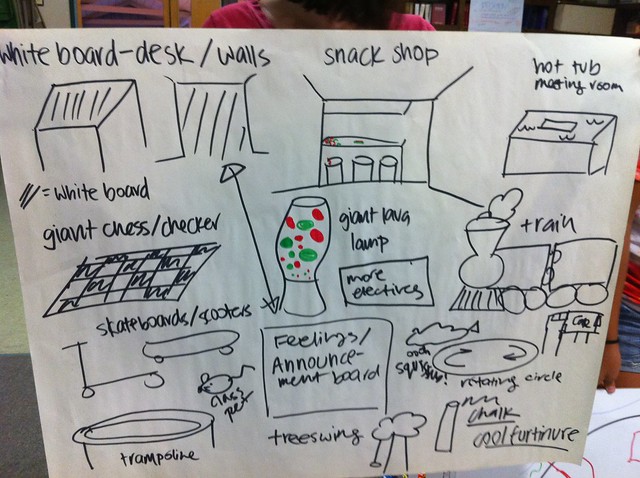
Near the 3/4 mark of the session I had the participants use a set of brainstorming rules that I just shared to engage in a little group brainstorm about how we can inspire more play in our schools...I was blown away at the contributions that participants made in the very short amount of time they were given (click here to see the ideas of session participants...a few minutes later I asked them to create a prototype-click here to see photos of a few of their prototypes). Design thinking is a fairly amorphous concept and I hope this exercise and the session at large gave all who participated a feel for the possibilities associated with this methodology.
Finally, a special thanks goes to Lorna Costantini, Peggy George, and Kim Caise for their incredible work in sustaining the Classroom 2.0 Live Saturday sessions. I consider myself fortunate to have access to these fantastic and free learning opportunities each Saturday. Be sure to check out their archives and to tune in live on Saturday at noon eastern/9 am pacific in North America (16:00 GMT/UTC) .
The Blip.TV archive is embedded below. Click here to view the archived elluminate session complete with Chat. The show notes and links are posted here.
In early September I had the chance to facilitate a session on creative problem solving using 'Design Thinking' for a group of sophomore students. What follows is a little lesson description along with photos and a reflection on the process.
A range of brainstorming and design medium such as post it notes, large butcher paper/large post it paper, markers of all colors and sizes, blue painters tape, 8 1/2" x 11" scrap paper, pencils, pens, wood blocks, legos, sidewalk chalk, and any other materials that would be suitable for building prototypes and models.
Quotes from Tim Brown's book, Change by Design, posted on 8 1/2" x 11" paper. These are used as a warm up activity when students come trickling into the room. Click here to view slides of the quotes.
Age Range:
Elementary school all the way up to adults (I did this activity with 15/16 year old sophomore high school students)
Time:
This entire activity took 3 hours.
Lesson Flow:
Warm up: 10 Minutes
As students enter the room, ask them to walk about and look at the 10-14 different quotes from Tim Brown's Change by Design. Encourage them to pick one or two that really resonate. Gather back in the circle and then give students the opportunity to share their favorite quote. Ask that they also share why.
Brainstorming: 20 minutes
Watch the two videos on brainstorming and David Kelly's fireside chat video. After the videos are over, ask the students to generate a list of brainstorming rules. Ask two students to be the scribes and record the rules on a large piece of butcher paper. The essential rules are as follows: Defer judgement, encourage wild ideas, build off the ideas of others, 'Headlines,' record everything, and quantity over quality. Post the brainstorming rules ideas on the wall for everyone to see.
Actual Brainstorming: 5 minutes
After watching the videos, break the students into teams of two and have them brainstorm as many things as possible around campus that they'd like to re-design. This could include things like the classroom layout, new uniforms for their team, better bike accommodations, better lockers, etc. Encourage them to go for wild ideas, quantity over quality and to practice the established rules for brainstorming. Give students no more than 5 minutes to brainstorm, but encourage them to get 100 ideas (they won't be able to come up with 100, but this really pushes them to look for the non-obvious when brainstorming).
Prototyping Overview: 5 minutes
Show the students the video, "Have Paper, Will Prototype." The point is to show them that the point of prototyping is to bring your thinking alive through some type of object. A prototype can be just about anything-the boy in this video uses a piece of paper to share a design for a video game. Another key aspect of prototyping is that is should be low resolution-eg, we don't want to spend too much time on the prototype-create a down and dirty prototype to expose our thinking to feedback as soon as possible! Read some of the quotes from Tim Brown's book on prototyping directly to the students...this will help them formulate a picture of what prototyping is all about. Show students the different prototyping media that they may use: butcher paper, post its, wood blocks, legoes, blue painters tape, sidewalk chalk, etc are all useful mediums.
After the prototyping video and discussion, tell student pairs that they have to quickly pick one idea from their brainstorm list to turn into a rough prototype.
Student Project Prototyping: 3 minutes
Give students 3 minutes to create a rough prototype of their idea.
Prototype sharing: 5-10 minutes
Give each group of students 30 seconds to share their prototype. After each group shares, allow 1 minute for feedback (groups should record the feedback they receive from their peers, but should not respond to it directly). This phase needs to happen QUICKLY.
Prototyping Version 2.0: 3 minutes
Give students 3 minutes to incorporate feedback into a new iteration of their prototype. If you want to go through another round of feedback and iteration, go for it.
Next steps discussion: 5 minutes
After version 2.0 of their prototypes are completed, ask them what they might do next to receive feedback. Who are some other folks they might want to share their ideas with? Might they want to do some additional observation and research?
Break: 5 minutes
The Power of Play Video: 15-20 minutes
When the students reassemble, show them Stuart Brown's TED Talk on the importance of play. Talk with the students about the importance of a sense of play in the creative process prior to the video starting. Show the first 10-12 minutes of the video. After the video is over, ask volunteers to share their thoughts and take aways on the video. What moved them? What will they remember?
The Deep Dive Video and Discussion: 20-30 minutes
Show the students the "Deep Dive," which is a great glimpse into the creative process used by the design firm, IDEO. If you can get your hands on the entire 20 minute video, use it. Otherwise the 8 minute clip from YouTube will be fine.
Design Challenges:
After the Deep Dive video and discussion, launch the students into teams of 4-5 to work on various different design challenges. I had the students work on the following challenges around our campus: inspiring more play, re-designing our student clubs program, and re-engineering our school's dining room. Students were given design briefs on each one of these challenges. The briefs contained videos, documents, maps, and other materials that would be useful in helping them understand their challenge. Students were given the balance of their time to brainstorm solutions and to build a prototype to share with others for feedback.
A few photos/short videos of my students engaged in brainstorming, prototyping, and sharing of their ideas:
Students engaging in the prototyping of their ideas:
Students getting introduced to their design challenge by interacting with and discussion the brief materials:
Students sharing their prototype for redesigning the club experience at our school:
Prototype of various ideas for inspiring more play:
Students design a prototype for an 'alternate to stairs' so it is easier to get their heavy roller backpacks between the different floors at our school (backpacks are even heavier this year now that each student is carrying a laptop!)
Student designers in action. Just a long shot of several of the groups working on prototypes for their ideas:
One group of students was HIGHLY interested in re-designing our daily schedule. This is a photograph of this group sharing their thinking via a prototype they created:
I'm a HUGE fan of play. All sorts of good things happen when you give humans the opportunity to play. Stuart Brown talked about the vital nature of play in his TED talk and even wrote a book about it. One of the concerns of our new laptop program has to do with play. Adults were fearful that our students would play less during discretionary time periods once they started bringing computers to school each day. As a result of this concern, our school started putting out all sorts of balls, jump ropes, frisbees and other objects for the students to use during discretionary time blocks like recess and lunch. Guess what is happening? They are playing!
We even took a piece of sidewalk chalk and created a four square court...you should see the kids get in line to play. The line often times will run 5-10 people deep! I've even enjoyed jumping in on a few games (the game is much more difficult than I remember by the way).
I'm sure the laptops will inspire all sorts of interesting learning experiences for our teachers and students in the years to come. At this point, however, I'm quite excited that our laptops have simply inspired us to play more!
I'm quickly becoming a huge fan of "Design Thinking" as an instructional platform for inspiring creative thinking and unique approaches to projects and problems. I recently facilitated a a three hour project based learning experience with 60 sophomores where we used Design Thinking-more on that in a later post hopefully. The work that the students did was fantastic and the ideas that they generated for their various design projects blew me away.
But for now, I wanted to share a few of my favorite quotes from Tim Brown's book on Design Thinking titled, Change by Design. It is a book that I highly recommend reading if you are interested in providing your students, teachers, administrators, etc with a framework for creative thinking while working in teams.
Flip through the slide deck below for some great quotes on Design Thinking from Tim's book:
Our new Head of School asked me to work with our school's librarian and global programs director to develop a list of suggested books for our school's board to read. Embedded below is a living document of collected titles thus far-I feel as though this is a nice compilation of resources that meshes quite nicely with our school's strategic plan.
What might we be missing?? What are you reading that might fight with these titles?
Some of you know that the school I work at uses Google for our email and collaboration platform. I've used used many different email systems in my career as a school technology coordinator - Eudora client (not sure what powered this system), Exchange, FirstClass, and now Google. Without a doubt, Google's platform is superior for empowering both individuals, teams, and large communities. Whereas exchange and MS Office are all about individual productivity, Google is all about team productivity and hyper-collaboration.
One of my favorite things about the Google platform is the regular updates the Google Team pushes out to the platform. Yesterday during our faculty meeting I did a 25 minute update on some of these new features-in reality, many of these features are not exactly new, but for many who attended my session yesterday this was their first exposure to the updates.
This past week I lead onsite student laptop learning seminars for all of our students in grades 9-12. I was fortunate to have co-worker buddies run these sessions for the middle school students-I'm not sure how we would've managed otherwise.
Each student was onsite for a minimum of two hours for these seminars...before setting up our computers, installing software, enrolling in the online component of this learning experience, etc, I gave a 20 minute introductory talk to each grade level. Many of our students wonder why we're going the route of requiring everyone to starting bringing a laptop to school each day-instead of answering this question for the students, my aim was to ask more questions in the context of various waves of technology innovations throughout history. It is my intention that they arrive to their own conclusions and become an active part of the conversation centering around laptop learning in the classroom.
This particular recording is from my talk with the sophomores-this also happened to be the last group I worked with and I can't say I was on my A game here. But I hope this gives you a sense as to how we set the table for our laptop learning experience here at our school. The slideshare deck has audio and only includes the first 20 minutes of my talk. The rest of the slides in the form of a google presentation are also embedded below.
Some of the readers of this little blog know that the school I work at will be embarking down the path of laptop learning this year. As part of this program, all students will be on campus for two hour long laptop learning orientation sessions prior to the start of the school year. The first session is tomorrow and the second is on Wednesday. I've been prepping my slide deck that I'm using to guide these seminars and I developed the following essential question that I hope serves as a guide for us over the next few years...
"how can we use our laptops to personalize learning, manage complex streams of information, interrogate information validity, reflect upon our own learning, engage with local and global issues, publish for a large audience, build cool stuff, develop empathy, network with others and expand our cultural competencies and awareness?"
I'll be meeting with all students in grades 9-12 over the next two days - I think it is going to be really fun having the opportunity to do these orientation seminars with this students. I hope they are receptive to this essential question...wish me luck!
I just drafted up and posted this email to the 9 new faculty members here in our school community. I essentially wanted to give them a sense as to how I could assist them with their practice. It was a much longer email than I was hoping for, but it serves the purpose I think. I'm rebroadcasting here at my blog in the event that other instructional technology coordinators may want to remix this for their own purposes.
--------------------------------------------------------- August 20, 2010
Dear new faculty members,
My apologies for missing you all at Monday's orientation, but I was a bit busy looking afterour little newborn(WARNING: if you ever reference a human form that is 4 feet or less, you're bound to be exposed to thousands of baby photos).
As promised, here is areally longintroduction with links to samples from my portfolio...hopefully this gives you a sense as to who I am, what I do, and how we might be able to collaborate on some interesting projects this year...
So here goes...
I'm entering my third year at Castilleja, but previous to my experience here I served as the middle school technology coordinator at the University School of Milwaukee. Prior to my work at USM, I worked as a technology coordinator at a K-8 school in the Milwaukee Public School system, a computer lab teacher in an 'open education' grade school in MPS, and a grade school teacher in a 'non-graded, continuous progress' school in MPS.
Throughout these projects, I've worked in a variety of capacities from pre-project collaborative concepting, to serving as an 'extra set of hands' in the classroom, to instructional lead.
A few other projects from the past few years may be perused herein my professional portfolio.
Over the past few years here at Castilleja I've also been involved in some of our professional development proceedings. Last year I worked with a small team of Castilleja Faculty members to plan out last June's "Summer Learning Institute," which involved a deep dive into the world of project based learning, portfolios, laptop learning, and digital storytelling. The entire experience is archivedonline here. Two years ago I also helped plan and implement Castilleja's spring professional development day...more on thathere.
Throughout my career in the world of educational technology, I've made just about every mistake possible. It wasn't so long ago that I thought the Internet was just a glorified yellow pages, blogs were a fad, social networking was a waste of time, and smartboard use was the highest form of technology integration. Its a good thing that I have a willingness and readiness to 'unlearn' as much as a learn .
See the icon links below my signature for some of the other spaces where I share and interrogate information, reflect on my practice, and attempt to make sense of things.
Looking forward to connecting with you soon!
Regards,
----------------------- Matt Montagne Instructional Technology Coordinator Castilleja School Palo Alto, California USA




 ).
).