Consider joining and participating in the "We Can Solve It" climate change action campaign. Great video below...consider embedding this video in your blog, myspace, etc in order to help spread awareness about We Can Solve It:
Saturday, June 14, 2008


Eliminating Servers/Best Platform for a New School
I've been watching a thread over on the ISED listserv develop over the past week or so dealing with the title of this post as the subject. It has been absolutely fascinating. The thread mostly started out as a "platform war" type of thing, but then Derrel Fincher contributed a really interesting reply earlier this week...my reply to Derrel's excellent, visionary post is included further below in this blog entry:
My contribution to this thread from Friday, June 13th:
I'm amazed at the number of projects that our students and teachers have created over the past 24 months that require little to no local area network storage. I might also add that they've managed to do so using tools that are mostly free. I can't help but think that these kinds of projects will only proliferate going forward. Most of the large, media projects that our students create (movies, audio files, working on raw images) all get saved to the local hard drive of the iMacs anyway. Students then archive their finished pieces to their wikis, YouTube, DVDs, etc if they want to keep their project when they are done with it.
Most of the things that students save on network file servers include things like word files and powerpoints, and we've been transitioning the students to google docs for these types of things over the past year.
Here are a few projects that have required zero data storage on the LAN:
1. 5th grade school tour podcasts-students took pictures, wrote scripts in google docs, and then recorded their narration in garage band. With the exception of the google doc script, all media was saved to the local hard drive. Completed projects were then uploaded to my .mac account at: http://web.mac.com/mjmonty/Site/Podcast/Podcast.html
2. 7th grade booktalk voicethread projects...all media, including pictures and audio, is saved on voicethread.com. To view some of these projects, visit: http://usmenglish7.blogspot.com/2008/01/seventh-periods-book-talks.html
3. Famous Faces of Slavery projects completed by teams of 8th grade students in english class...all files saved on a wiki: http://famousfacesofslavery.wikispaces.com
4. 8th grade french class voicethread projects...students created their voicethreads and embedded them on their teacher's wiki page as a way to turn in their projects. Again, everything saved in voicethread and the wiki: http://usmfrench.wikispaces.com/Les+voicethreads
5. 8th Grade Washington DC Blog...we used this to chronicle our trip to DC this past spring. We uploaded gigs and gigs worth of photos and video to our middle school flickr account on a nightly basis. We also had a few students post cell phone photos live as they experienced the trip (this was really cool). See the blog at: http://usmdc2008.blogspot.com/
6. French class oral language samples recorded on portable voice recorders (Olympus WS110s) and posted to the class wiki: http://usmfrench.wikispaces.com/Interro+orale+15-4
7. Students in film class created an "Office" parody featuring many of the teachers at my school. They worked locally on the file and then posted to YouTube to share: http://www.youtube.com/watch?v=g5k6pfNHQno Students in the same class did a digital story about the Lincoln's assassination with the "Captain O Captain" poem by Whitman: http://youtube.com/watch?v=QBfq_6eVzBM
8. Students in 7th grade art class worked in teams to research an artist and genre and then created a collaborative google doc presentation to share with the class.
9. For their final unit of the year in American History class, students in Chuck Taft's 8th grade US history teacher maintained their traditional 3 ring binder with a wiki. Students created oral histories, videos, voicethread stories, participated in a "Civil Rights Era Facebook Community, etc using web based tools. Project home page: http://turningpoints08.wikispaces.com/
I could go on and on and on here, but you get the point. None of these projects required any network storage at all. Derrel's idea of purchasing as much bandwidth as possible makes a great deal of sense. All of the money saved by not having to purchase expensive LAN storage systems could be diverted to paying for increased bandwidth. Perhaps even some of that could be used for professional development and/or faculty enhancement!!!
Going forward, we are currently working with a consultant to setup an off site hosted Word Press MU network which will give all interested students and teachers a blog space with powerful podcasting capabilities. After the audio files are created, students and teachers will be able to upload them to their blogs as a podcast file. The audio files will live on a server in California. This system gives us 100 GB of storage with 1 TB of monthly bandwidth throughput...all for the very reasonable cost of $600 annually!!!
I've enjoyed this thread. Thanks for sharing everyone.
Cheers!!
Matt Montagne
Just a few additional thoughts:
1. Spend on bandwidth until it hurts.
2. If you are providing laptops to students, forget about having a traditional network except for authentication, and then just let them plug into the Internet and access your printers through the Internet, and even find a hosting service for file storage. The individual platform is not so important, but a good infrastructure is.
3. Plan on eliminating all servers. Difficult, if not impossible, but go in with the ideas that you don't need them. Instead, look for hosted solutions (ASP) for your needs. Most are designed to be accessed through a browser for most functions so the platform for the majority of your users is irrelevant. For the few power users that need a client instead of a browser, buy whatever the client supports. (Hosted may look like it costs more, but you don't need IT people with really deep skills--you need those with broad skills).
4. For your clerical staff, and even many of your teachers, spring for dual monitors and put in plenty of memory. Those two together have been the biggest productivity improvement for the buck and your clerical staff will love you. (People will tell you they don't need two until they actually use two--I've only had a couple tell me to remove the second monitor.
My contribution to this thread from Friday, June 13th:
I'm amazed at the number of projects that our students and teachers have created over the past 24 months that require little to no local area network storage. I might also add that they've managed to do so using tools that are mostly free. I can't help but think that these kinds of projects will only proliferate going forward. Most of the large, media projects that our students create (movies, audio files, working on raw images) all get saved to the local hard drive of the iMacs anyway. Students then archive their finished pieces to their wikis, YouTube, DVDs, etc if they want to keep their project when they are done with it.
Most of the things that students save on network file servers include things like word files and powerpoints, and we've been transitioning the students to google docs for these types of things over the past year.
Here are a few projects that have required zero data storage on the LAN:
1. 5th grade school tour podcasts-students took pictures, wrote scripts in google docs, and then recorded their narration in garage band. With the exception of the google doc script, all media was saved to the local hard drive. Completed projects were then uploaded to my .mac account at: http://web.mac.com/mjmonty/Site/Podcast/Podcast.html
2. 7th grade booktalk voicethread projects...all media, including pictures and audio, is saved on voicethread.com. To view some of these projects, visit: http://usmenglish7.blogspot.com/2008/01/seventh-periods-book-talks.html
3. Famous Faces of Slavery projects completed by teams of 8th grade students in english class...all files saved on a wiki: http://famousfacesofslavery.wikispaces.com
4. 8th grade french class voicethread projects...students created their voicethreads and embedded them on their teacher's wiki page as a way to turn in their projects. Again, everything saved in voicethread and the wiki: http://usmfrench.wikispaces.com/Les+voicethreads
5. 8th Grade Washington DC Blog...we used this to chronicle our trip to DC this past spring. We uploaded gigs and gigs worth of photos and video to our middle school flickr account on a nightly basis. We also had a few students post cell phone photos live as they experienced the trip (this was really cool). See the blog at: http://usmdc2008.blogspot.com/
6. French class oral language samples recorded on portable voice recorders (Olympus WS110s) and posted to the class wiki: http://usmfrench.wikispaces.com/Interro+orale+15-4
7. Students in film class created an "Office" parody featuring many of the teachers at my school. They worked locally on the file and then posted to YouTube to share: http://www.youtube.com/watch?v=g5k6pfNHQno Students in the same class did a digital story about the Lincoln's assassination with the "Captain O Captain" poem by Whitman: http://youtube.com/watch?v=QBfq_6eVzBM
8. Students in 7th grade art class worked in teams to research an artist and genre and then created a collaborative google doc presentation to share with the class.
9. For their final unit of the year in American History class, students in Chuck Taft's 8th grade US history teacher maintained their traditional 3 ring binder with a wiki. Students created oral histories, videos, voicethread stories, participated in a "Civil Rights Era Facebook Community, etc using web based tools. Project home page: http://turningpoints08.wikispaces.com/
I could go on and on and on here, but you get the point. None of these projects required any network storage at all. Derrel's idea of purchasing as much bandwidth as possible makes a great deal of sense. All of the money saved by not having to purchase expensive LAN storage systems could be diverted to paying for increased bandwidth. Perhaps even some of that could be used for professional development and/or faculty enhancement!!!
Going forward, we are currently working with a consultant to setup an off site hosted Word Press MU network which will give all interested students and teachers a blog space with powerful podcasting capabilities. After the audio files are created, students and teachers will be able to upload them to their blogs as a podcast file. The audio files will live on a server in California. This system gives us 100 GB of storage with 1 TB of monthly bandwidth throughput...all for the very reasonable cost of $600 annually!!!
I've enjoyed this thread. Thanks for sharing everyone.
Cheers!!
Matt Montagne
Friday, June 06, 2008
Office 2007 and Open Source email to faculty
I just sent the following email out to the faculty that I work with here at the University School of Milwaukee. I wanted to share it in this blog post in the event that this could be of use to some of you. I really believe in the power of open source as a means to address issues of equity and social justice. Office 2007, to me, is bloated, expensive, and has way too many unnecessary features for student use.
Anyway, enough of that...here is the email:
Here are the bookmarks Steve and I assembled for you to peruse as you’re getting acquainted with the new office interface:
http://del.icio.us/mjmonty/usmoffice2007
For any of you delicious users, if you find any good Office 2007 professional dev sites, tag them “usmoffice2007” and they’ll show up at the following link:
http://del.icio.us/tag/usmoffice2007
Cheers!
Matt
Additionally, I spoke with a few of you about some free and open source office options to Office 2007. Office 2007 licensing is extremely expensive, so you might consider taking a look at some of the following tools. I’ve used all of them and have found them to be great alternatives to paying for software:
Free and/or open source software options:
NeoOffice (for Mac) - http://www.neooffice.org/neojava/en/index.php
OpenOffice (Mac, Linux and Windows) - http://www.openoffice.org/
Google Docs (for any computer that can connect to the Internet): http://docs.google.com - google docs now offers the option of accessing your files without having to be connected to the Internet
If you’d like to read more about the value of open source and how it addresses issues of equity and social justice, visit:
http://www.infinitethinking.org/2008/02/promoting-digital-equity-with-web-20.html
Anyway, enough of that...here is the email:
Here are the bookmarks Steve and I assembled for you to peruse as you’re getting acquainted with the new office interface:
http://del.icio.us/mjmonty/usmoffice2007
For any of you delicious users, if you find any good Office 2007 professional dev sites, tag them “usmoffice2007” and they’ll show up at the following link:
http://del.icio.us/tag/usmoffice2007
Cheers!
Matt
Additionally, I spoke with a few of you about some free and open source office options to Office 2007. Office 2007 licensing is extremely expensive, so you might consider taking a look at some of the following tools. I’ve used all of them and have found them to be great alternatives to paying for software:
Free and/or open source software options:
NeoOffice (for Mac) - http://www.neooffice.org/neojava/en/index.php
OpenOffice (Mac, Linux and Windows) - http://www.openoffice.org/
Google Docs (for any computer that can connect to the Internet): http://docs.google.com - google docs now offers the option of accessing your files without having to be connected to the Internet
If you’d like to read more about the value of open source and how it addresses issues of equity and social justice, visit:
http://www.infinitethinking.org/2008/02/promoting-digital-equity-with-web-20.html
Saturday, May 24, 2008
Lesson Plan: 5th Grade Student-Teacher Feature Podcast Project
This lesson turned out to be one of our best projects of the year in our 5th grade media literacy class. The overview and project description is posted online here. I teach a 5th grade media literacy/language arts class at USM and I only get to see the students once per cycle, which turns out to be roughly 1x per 8 calendar days (and if we miss a class due to a special event/field trip, sometimes it can be every 16 days!) In late April I had a little brainstorm to do something involving the students conducting interviews with teachers and staff here at USM. I wanted to have the students record their interviews and then do a little audio editing prior to posting the file as a podcast. Part of me thought this would bomb and part of me thought this would turn out as nicely as some of the other media projects the kids have created this year.
To solicit faculty staff participation in this project, I sent out an email back in April and asked interested folks to fill out this google doc online form (I'm a HUGE fan of google docs forms by the way!) The Teacher Feature Podcast projects are being posted online here.
Basically I had the students work in teams of 2-3 to do a little light research by reading the faculty/staff bio page at the school website of the person they were assigned to. While they were doing this, I had them open a google doc, collaborate the google doc with each other, and begin writing their 15-20 questions. This number of questions worked out great, as most interviews turned out to around 5 minutes or so. After students created their interview questions, I reviewed them and then sent the students off to have the conversation. Students used the Olympus WS110 portable recorders that we bought a few months ago. As a side note, I really like these recorders, but they do record in the "WMV" format, which requires a free program for the Mac called, "Switch," to convert the files to mp3 format. I would love to find low cost portable recorders that record natively in mp3 format, but they're hard to find and they seem to be a much more expensive than the WS110.
After students recorded the interviews, I pulled the WMV files off the Olympus recorders and converted them to mp3s using Switch. We then had the the students open Garageband and create a new podcast episode. We dumped the mp3 of their recorded file into their garageband podcast project and then added an intro, an outro, and a little jingle/bumper music file at the beginning and end of the project.
Here are a few take-aways from this project:
1. I think this project was highly authentic. The students absolutely loved participating in the project, and I think this has to do with the high degree of authenticity.
2. The students really pulled some interesting information out of the adults. I learned several new things about people with whom I've worked very closely with for several years (I know many other teachers who listened to the recordings who feel the same way).
3. The kids did a great job of customizing their interview questions to the background of their subject. Having them read their online bio was really helpful. Students could then ask questions like, "What was Yale like back when you attended school there?" It was also helpful having a few suggested questions for them to ask as well. These were posted at the project overview page.
4. I wish the kids had more time to edit the audio down after recording the interviews. We could've done more with cleaning up some the lulls and trimming out some excess audio at the start/finish of the interviews. But the reality of the situation is that I see the students very infrequently.
5. I also wish we had more time to talk about the elements of a good interview. I wish I would've encouraged students to ask more follow up questions where appropriate. But this is something that will come with more experience and comfort I'm sure. I did tell the students not to ask too many questions with yes/no or single word answers. For the most part, students asked follow up questions to these questions.
6. Arranging time for the kids to meet the adults was a bit of a cat herding act. In the end, I just starting sending the kids down to meet their subjects on a spontaneous basis. This seemed to work OK, but I'll still have a few students who will not be able to complete their interviews because of scheduling complications.
7. Giving students skills with conducting simple interviews like this opens the door to some amazing possibilities in the future. If students gain experience and comfort with this format, they'll then be able to record oral histories of family members, war veterans, older folks who have personal accounts of different historical time periods, etc. Our 8th graders are currently conducting interviews on the topic of the cold war and they're doing a great job. Having prior experience recording conversations with adults will be helpful in collecting some powerful oral histories in the future.
8. Older students can do this too! I know these seem "cute" and geared toward younger students, but I believe students in high school and higher ed can do this type of thing to create some extremely powerful content as well. If you have any ideas for projects with older students, please leave a comment.
To solicit faculty staff participation in this project, I sent out an email back in April and asked interested folks to fill out this google doc online form (I'm a HUGE fan of google docs forms by the way!) The Teacher Feature Podcast projects are being posted online here.
Basically I had the students work in teams of 2-3 to do a little light research by reading the faculty/staff bio page at the school website of the person they were assigned to. While they were doing this, I had them open a google doc, collaborate the google doc with each other, and begin writing their 15-20 questions. This number of questions worked out great, as most interviews turned out to around 5 minutes or so. After students created their interview questions, I reviewed them and then sent the students off to have the conversation. Students used the Olympus WS110 portable recorders that we bought a few months ago. As a side note, I really like these recorders, but they do record in the "WMV" format, which requires a free program for the Mac called, "Switch," to convert the files to mp3 format. I would love to find low cost portable recorders that record natively in mp3 format, but they're hard to find and they seem to be a much more expensive than the WS110.
After students recorded the interviews, I pulled the WMV files off the Olympus recorders and converted them to mp3s using Switch. We then had the the students open Garageband and create a new podcast episode. We dumped the mp3 of their recorded file into their garageband podcast project and then added an intro, an outro, and a little jingle/bumper music file at the beginning and end of the project.
Here are a few take-aways from this project:
1. I think this project was highly authentic. The students absolutely loved participating in the project, and I think this has to do with the high degree of authenticity.
2. The students really pulled some interesting information out of the adults. I learned several new things about people with whom I've worked very closely with for several years (I know many other teachers who listened to the recordings who feel the same way).
3. The kids did a great job of customizing their interview questions to the background of their subject. Having them read their online bio was really helpful. Students could then ask questions like, "What was Yale like back when you attended school there?" It was also helpful having a few suggested questions for them to ask as well. These were posted at the project overview page.
4. I wish the kids had more time to edit the audio down after recording the interviews. We could've done more with cleaning up some the lulls and trimming out some excess audio at the start/finish of the interviews. But the reality of the situation is that I see the students very infrequently.
5. I also wish we had more time to talk about the elements of a good interview. I wish I would've encouraged students to ask more follow up questions where appropriate. But this is something that will come with more experience and comfort I'm sure. I did tell the students not to ask too many questions with yes/no or single word answers. For the most part, students asked follow up questions to these questions.
6. Arranging time for the kids to meet the adults was a bit of a cat herding act. In the end, I just starting sending the kids down to meet their subjects on a spontaneous basis. This seemed to work OK, but I'll still have a few students who will not be able to complete their interviews because of scheduling complications.
7. Giving students skills with conducting simple interviews like this opens the door to some amazing possibilities in the future. If students gain experience and comfort with this format, they'll then be able to record oral histories of family members, war veterans, older folks who have personal accounts of different historical time periods, etc. Our 8th graders are currently conducting interviews on the topic of the cold war and they're doing a great job. Having prior experience recording conversations with adults will be helpful in collecting some powerful oral histories in the future.
8. Older students can do this too! I know these seem "cute" and geared toward younger students, but I believe students in high school and higher ed can do this type of thing to create some extremely powerful content as well. If you have any ideas for projects with older students, please leave a comment.
Saturday, May 17, 2008
Embedding Flickr Photos with Notes
My Twitter buddy Derrall Garrison showed me how to add a flickr photo with hover over notes directly into a blog or wiki using a javascript code from Yuan. Go ahead and hover over the photo of my commuter bike below and you'll see the notes. If you'd like to try this, click the link here for the needed script to make the magic happen. You can even add a little toolbar to your browser to make this process super easy.
Thanks to derrallg for showing this to me!

Thanks to derrallg for showing this to me!
Friday, May 16, 2008
National Ride Your Bike to School/Work Day
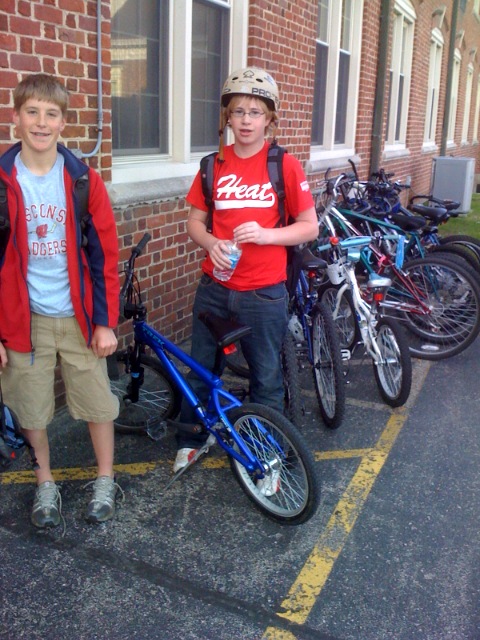 We had many, many teachers, students and parents ride their bikes to campus today. We managed to fill the bike racks well beyond capacity! Click here to see a few photos from the morning out by the bike rack.
Also, in order to celebrate Bike to School Day, I created a little interactive photo at flickr with my commuter bike that I built up last summer. I custom designed this bike and learned quite a bit from doing this. If you're considering a commuter bike, this photo may be of use to you.
Ride On!
Thursday, May 08, 2008
Washington DC...Web2.0 Style!!
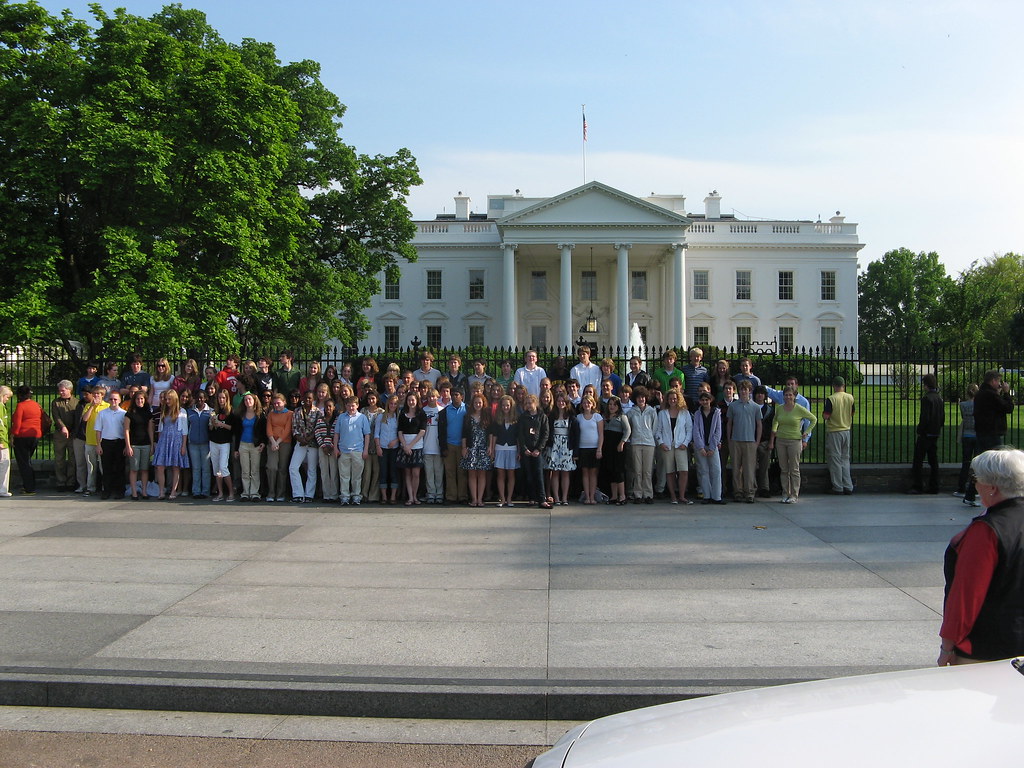 As many of you know, I was in Washington DC from Monday-Friday last week with our 8th grade class of 92 students. Click here to see the blog that we used to share pictures, photos, audio updates, twitter updates, etc. I have to say that it was simply a fantastic trip. The trip itinerary and logistics planning were outstanding (thanks to Chuck Taft and Francine Epellsheimer). The student behavior was quite good during all phases of the trip as well. And lastly, working on the media and content publishing was a total blast. For the past 5-6 years we've been posting pictures online throughout the trip for parents to see. Typically photos were taken by one or two adults and emailed back to school for someone to post on our web server via a web page editor like front page. This year was dramatically different. This year we kept school community members in touch with our progress in DC by using some pretty simple web2.0 tools. Below I'll highlight some of the things we did to keep our community members up to date on our progress throughout the week.
Here is how we collected and published our media while in DC:
1. Twitter updates-this turned out to be a really fun project. We had two students and myself posting twitter updates (all three of us were posting updates from our cell phones). We created a "USMDC" twitter account and then followed the two students who participated in the project. We placed a badge in the side bar of the blog that contained all of the USMDC updates and the updates of the two students. The student updates were playful, on task and in good taste. Next year I hope to expand this to include more students who are interested. Thanks to all of my twitterpals who followed our updates throughout the week!
2. Cameraphone Photos-Several students with cameraphones and email capacity participated in this project. Students took photos throughout the trip and emailed those photos to our middle school flickr account (flickr accounts have an email address that allow you to post photos from mobile devices via email). I setup the flickr account so all photos from the cameraphones were tagged, "cameraphones," automatically when they were uploaded. We then used flickr slidr, which is a third party flickr slide show application, to aggregate those photos in a side bar slide show on the blog. So every time someone took a photo and emailed the photo to the school flickr account, it appeared in the slide show on the blog. This was pretty cool. Near the end of the week, I was pretty much the only person contributing cameraphone photos. I have to say that some of the best photos photos were the ones taken by the students. I love this one from the Nationals game!
3. Flickr video-I was really surprised at how well this worked. This is something we really weren't planning on doing. We brought two flip video cameras out to DC to record video for a DC Memory DVD that we typically make and give out to the 8th graders at the end of the year. However, we started posting a few short video clips to YouTube on the first day and we never looked back. We ended up posting over 50 short video clips, which is amazing (5 years ago we would've been luck to post 50 photos from the entire week!!!)
4. "DL on DC" nightly live updates via ustream.tv. This actually turned out to be on of the high lights for me. Each night at 10:30 PM EDT students wrote up a very short, 3 minute script. We then sent out an email to teachers and parents with a link to ustream. Students went through the script live and then we spent the last 5-10 minutes of the broadcast having the students field questions from the audience. We did 4 live broadcasts and each one had between 10-30 viewers. All of the students who participated in the live broadcasts did a fantastic job!
5. Flickr Photos-we posted high resolution photos taken mostly be myself and another teacher each evening. This worked really, really well. Each day we tagged the photos slighly differently. For examle, the monday photos were tagged, "dc08monday." This allowed us to set up the links to the photos ahead of time on the blog. All we had to do was batch tag the photos as we uploaded them to flickr and they automatically flowed into the correct page on flickr, which was really quite slick.
6. Gcast updates-this is the second year that Chuck Taft, our 8th grade US History teacher, has done podcast updates via cell phone and Gcast. He did a host of updates over the course of the week, including live updates from the different memorials and sites that we visited. Chuck interviewed students in some of his Gcast updates as well.
7. Recorded audio-using a little Olympus WS110 recorder and a Samson H2 recorder, I captured a pile of audio throughout the trip. I recorded an interview with our incredible bus driver, Tyrone Brown, while we were at Mount Vernon on Friday. I also recorded our bus drivers as they told us the history of the greater DC area as we were traveling about in our tour bus. Only two of the audio recordings are currently posted, but over the next week or so I would like get the majority of the audio online.
Wednesday, May 07, 2008
Interactive Civil Rights Timeline Project
Our 8th grade students (13-14 year olds) here at USM are just beginning their study of the Civil Rights movement. Yesterday in class students developed their background knowledge on "Life in Jim Crow America" using an in-class/homework guided study activity created by their outstanding teacher, Chuck Taft. Click here to view the activity from yesterday dealing with Jim Crow America.
After building a little background on Jim Crow, the students worked in class today to create a collaborative/interactive timeline of several events from the Civil Rights movement. Chuck built up a wonderful plan for the interactive timeline and the lesson is posted online here. In class he had students volunteer to pick 1-2 of the events and do a little research using ABC-CLIO, their textbooks, or a site discovered via a google search (each student had a laptop from our school's mobile laptop lab). Students then signed into dipity using a generic account that Chuck created. It worked very well having 15-20 students sign in under the same account and editing the dipity timelime simultaneously-this was something we weren't quite certain about when we were planning this out last night.
Students were required to do the following for each event that they added to the collaborative timeline:
1. Write a brief description that outlined the cause and impact of the event.
2. Include the event location. By entering the location a point on a map is added to the timeline.
3. Include an image.
4. Include a related YouTube video.
In their 40 minute period, each student added at least one event to the timeline. Some students added a second event as well. All students were then required to embed the project in their own wiki that they are using as a digital notebook for the final unit of the school year. Click here to see a student digital notebook sample (this sample notebook is actually being worked on by two students collaboratively).
At the end of each period Chuck shared the collaborative map with the students and showed them the different views that dipity allows (timeline view, flipbook view, list view, and map view-this is a really powerful feature).
What are some other lesson possibilities using this tool?? This has some wonderful possibilities for language arts/literature, science, etc.
The interactive timelines that each class worked on may be surfed below:
Period 1
Period 2
Period 3
Period 4
Period 6
I have to give a shout out to the folks at Edtech Weekly for the lead on dipity. I believe Dave Cormier mentioned this tool in one of their Sunday webcasts recently. Thanks!
one final caveat...I take no credit for this project! It was all planned and developed by our 8th grade history teacher, Chuck Taft. I only write about it here as a means to share this lesson idea with others.
After building a little background on Jim Crow, the students worked in class today to create a collaborative/interactive timeline of several events from the Civil Rights movement. Chuck built up a wonderful plan for the interactive timeline and the lesson is posted online here. In class he had students volunteer to pick 1-2 of the events and do a little research using ABC-CLIO, their textbooks, or a site discovered via a google search (each student had a laptop from our school's mobile laptop lab). Students then signed into dipity using a generic account that Chuck created. It worked very well having 15-20 students sign in under the same account and editing the dipity timelime simultaneously-this was something we weren't quite certain about when we were planning this out last night.
Students were required to do the following for each event that they added to the collaborative timeline:
1. Write a brief description that outlined the cause and impact of the event.
2. Include the event location. By entering the location a point on a map is added to the timeline.
3. Include an image.
4. Include a related YouTube video.
In their 40 minute period, each student added at least one event to the timeline. Some students added a second event as well. All students were then required to embed the project in their own wiki that they are using as a digital notebook for the final unit of the school year. Click here to see a student digital notebook sample (this sample notebook is actually being worked on by two students collaboratively).
At the end of each period Chuck shared the collaborative map with the students and showed them the different views that dipity allows (timeline view, flipbook view, list view, and map view-this is a really powerful feature).
What are some other lesson possibilities using this tool?? This has some wonderful possibilities for language arts/literature, science, etc.
The interactive timelines that each class worked on may be surfed below:
Period 1
Period 2
Period 3
Period 4
Period 6
I have to give a shout out to the folks at Edtech Weekly for the lead on dipity. I believe Dave Cormier mentioned this tool in one of their Sunday webcasts recently. Thanks!
one final caveat...I take no credit for this project! It was all planned and developed by our 8th grade history teacher, Chuck Taft. I only write about it here as a means to share this lesson idea with others.
Tuesday, May 06, 2008
Student Hall of Fame!
Below is a sample project from a 6th grade student that I work with here at my school. Javier and his 6th grade peers worked on a math project where they had to study a bridge in their local community, take photos of it, and then compare it to another bridge. The students assembled their projects using their ed.voicethread spaces. Javier is only joining us for the current academic year. Next year he moves back to his home in Spain. His voicethread is narrated in both English and Spanish.
Here is the downside of ed.Voicethread. You may only leave a comment if you are part of the ed.voicethread network. This has been my quandry with the notion of ed.voicethread. The upside of ed.voicethread is that all students have their own unique space where they can build as much content as they'd like and then maintain it from year to year. I'm still in a quandry about whether or not to go with ed.voicethread on a larger scale in our middle school next year (and this isn't so much a financial decision as it is an issue of losing the capacity for authentic commenting/interaction).
Here is the downside of ed.Voicethread. You may only leave a comment if you are part of the ed.voicethread network. This has been my quandry with the notion of ed.voicethread. The upside of ed.voicethread is that all students have their own unique space where they can build as much content as they'd like and then maintain it from year to year. I'm still in a quandry about whether or not to go with ed.voicethread on a larger scale in our middle school next year (and this isn't so much a financial decision as it is an issue of losing the capacity for authentic commenting/interaction).

Sunday, May 04, 2008
Open Source and Schools
 As Chris Pirillo says in a recent blog post and show, "The future of software is open source." I couldn't agree more...
We hear about budget cuts in schools practically every day. School budget cuts affect some of the most important aspects of schools, including fine arts and physical education. Yet many of these very same schools who are cutting some of the most important programs for our children continue to pump tens of thousands of dollars into closed, proprietary software systems (in large districts we are probably talking six figures). Unfortunately many of our schools and districts are so "lock, stock and barrel" with closed systems that they feel as though they can't make a change because they've already invested so much in proprietary systems.
Our kids need exposure to the world of open source. Not only in terms of an end user experience, but also in the development of these tools. Why? Because the rest of the world is moving away from using closed, proprietary and expensive software solutions. How does one make money off of developing software and giving its underbelly away for free? Read this article for a glimpse at how the open source service and software add-on industry is creating opportunities for people all over the planet.
Alex Inman is doing some pretty amazing things in terms of leveraging open source software solutions on an enterprise level at the Whitfield School in St. Louis, MO USA. He has reduced the organization's software licensing budget significantly, freeing up funds to be used for much more important purposes in their school program. Alex was interviewed on the 21st Century Learning webcast last year about Whitfield's move to the Linux operating system on student laptops. Listen to the interview online here.
Leveraging open source solutions schools has value on many levels. First off, it exposes kids to the world of open source software development. This is something they need to know about and have experience with for their future. Secondly, open source democratizes the school experience and helps conquer the digital divide. Closed and proprietary software systems increase the digital divide, even when the software companies offer "academic" discounts for students, teachers and educational institutions. Lucie deLaBruere wrote a wonderful post recently over at the Infinite Thinking Machine on promoting digital equity through the use of open source and web2.0 tools. Steve Hargadon wrote a post on FOSS (Free and Open Source Software) in schools over at the Tech learning blog a few months back. Think about what our schools could do with the cash savings from using open source tools.
At the end of the day, it really doesn't matter much what you and I think about the world of open source software and the impact that it will have on schools. Open source will eventually crush proprietary based software models and we'll all be better off when it does.
Just a few open source resources available on the web:
Subscribe to:
Posts (Atom)