We've made some really great progress on integrating a Moodle virtual learning network and a Google Apps for Education collaboration/communication network. Major, major props to my co-worker, Adam Contois, for engineering this on the software side of things. Adam is a model 21st century school IT professional who believes in the importance of providing free/open source collaboration tools that empower members of the learning community.
While we are just scratching the surface on what this might mean and look like for us here at Castilleja, we now know the following based upon the setup instructions over at Ben Wilkhoff's blog:
1. Accounts are created and managed in Moodle (or, you may use LDAP to manage your accounts). No need to re-create the accounts in the Google admin console.
2. When the user signs in to Moodle, they see a block with links to gmail, calendar, docs, etc. When they click a link, they're taken to a page where they have to enter a word verification code and accept the Google Terms of Service. After they accept, a Google Apps account is automatically created for them.
3. All authentication/sign-in happens via moodle. If a user attempts to go directly to Google Apps, they are re-directed to Moodle to authenticate. After signing in at Moodle, they are bumped over to Google Apps. While we like this, we also know that this could be a weakness. What happens if Moodle goes down? Or, in our case, Moodle sits on our network and we're concerned about network outages that would prevent users from getting to their Google mail, docs, etc. We're in the process of developing a redundancy so that if Moodle does bork out, the users would be able to sign in directly at the Google Apps page (chance are that the uptime with Google is going to be MUCH higher than anything a school organization can provide).
That is it for now...I just wanted to leave this reflection to share our progress to date. A screencast that shows this process will be posted later. Many thanks to Ben for sharing this on his blog.
Below is a wonderful "CommonCraft" inspired video that brings to life the power associated with an approach to instructional design that utilizes Google Apps for EDU, Moodle, blogs and wikis:
Showing posts with label moodle. Show all posts
Showing posts with label moodle. Show all posts
Thursday, April 02, 2009


Saturday, February 28, 2009
Google-Moodle Integration
OK, the story keeps getting better. In my previous post I mentioned what we've been learning lately about the integration between moodle 2.0 and the open source ePortfolio platform, Mahara. I was just reading Miguel Guhlin's blog post on Google Apps integration with Moodle. These are incredible developments...5 years ago if you told me that there would be a full virtual learning network that both students and teachers could contribute to AND integration with a email/collaboration suite that was accessible across multiple platforms/devices, I would've called you a liar. I would've called you an even greater liar if you then told me that this would all come at a price tag of ZERO dollars.
Well, that is exactly what exists now with the integration between Moodle, Mahara, and Google Apps. Incredible stuff. Check out the post over at Miguel's blog for the complete 411 on this process.
Well, that is exactly what exists now with the integration between Moodle, Mahara, and Google Apps. Incredible stuff. Check out the post over at Miguel's blog for the complete 411 on this process.
Friday, February 27, 2009
Moodle 2.0 Alpha and Mahara ePortfolio Integration
Adam Contois and I are really, really excited about the possibilities associated with Moodle 2.0 and its new integration with the fantastic ePortfolio solution, Mahara. Moodle 2 is still in alpha, but Adam recently set this up here on our LAN so we could demo its integration with Mahara and Google Docs. Right now we only have it setup with the capability for students to copy and push files from the Moodle virtual learning space over to their ePortfolio in Mahara and their Google Docs. We're scratching the surface of single sign on integration between Moodle 2 and google apps for education network and we're also looking at some of the other 3rd party integration features (flickr, Amazon S3, box.net, etc).
I've said it before at this blog, but I think we to think differently about assessment (even beyond rubrics) as school 2.0 continues to emerge and develop. Authentic student ePortfolio spaces should be a major component of this paradigm shift.
Major, major props to both the Mahara and Moodle open source communities for their outstanding work on this project.
The screencast below is pretty low budget, but hopefully it gives you a better idea of what this integration looks like.
I've said it before at this blog, but I think we to think differently about assessment (even beyond rubrics) as school 2.0 continues to emerge and develop. Authentic student ePortfolio spaces should be a major component of this paradigm shift.
Major, major props to both the Mahara and Moodle open source communities for their outstanding work on this project.
The screencast below is pretty low budget, but hopefully it gives you a better idea of what this integration looks like.
Tuesday, February 10, 2009
Keeping it Digital-Publishing Options for Students and Teachers
Instead of printing assignments out and turing them in, what about considering some of the following online publishing options? In addition to saving paper, digital publishing allows students the opportunity to share their work with a broader community for review and feedback. We know that authentic audience is an extremely motivating factor for students when creating and sharing work. Spaces like the ones below can provide students with these authentic audiences.
Moodle Forum Posts - This is a great way to share/publish writing, photos, audio clips, and even videos that are posted at YouTube. By giving students the Moodle Forum as a publishing option, their work is further opened up to the learning community for review and feedback. Moodle forums are not accessible to the outside world, so they're a great space to publish work that might involve privacy issues.
YouTube, Blip.TV and other video hosting services - these are great spaces to post student created videos. Privacy and copyright both need to be considered prior to making a decision to post to these sites, but they are wonderful options for many student projects such as this Civil Rights video created by students that I worked with two years ago (the video has over 10,000 views!)
Blog posts for writing samples - Using moodle blogs, students may publish their writing so that it is visible only to others who have Castilleja moodle accounts, or they may make their work visible on the open web. The downside of the standard moodle blogging tool is that it does not allow commenting (the next major moodle revision will include commenting--hooray!) We actually have a second blogging option in our moodle network called, "OU Blogs," and this does allow others within the network to leave comments. OU Blogs also allows "Class Blogs," which is a single blog for a class that all members may post to and comment on. Depending on the age of the students, they could create blogs at sites like edublogs.org or blogger.com as well.
Google Sites within Castilleja's Google Apps network - Google Sites are essentially wikis, and all students and faculty who have a Casti Google apps network account have access to easily creating Google Sites. Just like with a wiki, you can give others access to your wiki so they can edit the pages and contribute content to the site. Here is a google site created by our 8th grade science teacher for the recent bridge project challenge that students were participating in.
Mahara ePortfolios - this is yet another publishing options for students. Imagine a space where students could showcase their work from across subject areas over the course of the entire year (or years). See my sample portfolio online here. Their work could then be reviewed by members of the learning community. Mahara allows the user full control over the visibility of the portfolio. Older students who are college bound may want to publish their portfolios on the open web, while younger students may elect to keep their portfolios only visible inside of the network. It is a very powerful and flexible open source social portfolio space and it also plays very well with Moodle (in moodle 2.0 it will have more full featured integration than it has now).
Moodle Forum Posts - This is a great way to share/publish writing, photos, audio clips, and even videos that are posted at YouTube. By giving students the Moodle Forum as a publishing option, their work is further opened up to the learning community for review and feedback. Moodle forums are not accessible to the outside world, so they're a great space to publish work that might involve privacy issues.
YouTube, Blip.TV and other video hosting services - these are great spaces to post student created videos. Privacy and copyright both need to be considered prior to making a decision to post to these sites, but they are wonderful options for many student projects such as this Civil Rights video created by students that I worked with two years ago (the video has over 10,000 views!)
Blog posts for writing samples - Using moodle blogs, students may publish their writing so that it is visible only to others who have Castilleja moodle accounts, or they may make their work visible on the open web. The downside of the standard moodle blogging tool is that it does not allow commenting (the next major moodle revision will include commenting--hooray!) We actually have a second blogging option in our moodle network called, "OU Blogs," and this does allow others within the network to leave comments. OU Blogs also allows "Class Blogs," which is a single blog for a class that all members may post to and comment on. Depending on the age of the students, they could create blogs at sites like edublogs.org or blogger.com as well.
Google Sites within Castilleja's Google Apps network - Google Sites are essentially wikis, and all students and faculty who have a Casti Google apps network account have access to easily creating Google Sites. Just like with a wiki, you can give others access to your wiki so they can edit the pages and contribute content to the site. Here is a google site created by our 8th grade science teacher for the recent bridge project challenge that students were participating in.
Mahara ePortfolios - this is yet another publishing options for students. Imagine a space where students could showcase their work from across subject areas over the course of the entire year (or years). See my sample portfolio online here. Their work could then be reviewed by members of the learning community. Mahara allows the user full control over the visibility of the portfolio. Older students who are college bound may want to publish their portfolios on the open web, while younger students may elect to keep their portfolios only visible inside of the network. It is a very powerful and flexible open source social portfolio space and it also plays very well with Moodle (in moodle 2.0 it will have more full featured integration than it has now).
Thursday, February 05, 2009
Thursday, Feb 5 Parent talk Update
This morning I gave a 30 minute talk regarding some of the new initiatives we have going on here at our school. The talk primarily focused on how we use Moodle as a virtual learning environment and we also talked about the Gator Radio Experience student run live radio project. Both projects align very closely with our school's new strategic plan which is titled, "Castilleja School...defining educational excellence for girls in the 21st century."
I feel bad that the talk went into overtime and that I didn't record the audio...I'll go back and record the audio along with the slides so folks who were unable to attend have the chance to listen in. Until that happens, here are a few links to resources that we talked about today:
1. Parents as Partners project - We have a blog and a Facebook group
2. Image from the Horizon Report
3. Gator Radio Experience Website/Blog and Gator Radio Experience on Twitter
4. Connect with Matt on Twitter or Facebook (or subscribe to this blog via RSS on the right or email subscription)
5. Casti's Moodle Virtual Learning Network
Thanks again to Martha and the CSA crew at Castilleja for inviting me to talk to the group today!
I feel bad that the talk went into overtime and that I didn't record the audio...I'll go back and record the audio along with the slides so folks who were unable to attend have the chance to listen in. Until that happens, here are a few links to resources that we talked about today:
1. Parents as Partners project - We have a blog and a Facebook group
2. Image from the Horizon Report
3. Gator Radio Experience Website/Blog and Gator Radio Experience on Twitter
4. Connect with Matt on Twitter or Facebook (or subscribe to this blog via RSS on the right or email subscription)
5. Casti's Moodle Virtual Learning Network
Thanks again to Martha and the CSA crew at Castilleja for inviting me to talk to the group today!
Tuesday, February 03, 2009
Save Money and Go Green
Lately I've been reading quite a few articles in school technology magazines regarding cost savings measures in light of our current global economic crisis. I've also seen a huge increase in the number articles on green technology. All sorts of creative and innovative solutions for doing more with less are being implemented in schools around the world. Here are a few cost savings/green ideas that will not compromise effective instructional technology programs:
1. Create a Google Apps network for your school now. It is free and very easy to manage. While you certainly can use the google apps network as a space for document collaboration only, the real savings happens when you move your school email to Google Apps. Google Apps now offers offline access to word processing files and email. Depending on what email system you are using, a move to Google Apps could mean a realized savings of tens of thousands of dollars annually.
2. Broaden the use of open source client software and server software. On the client side, Open Office, while not perfect, is a suitable replacement for Microsoft Office, especially when used in tandem with Google Apps (I do 99% of my office work in google docs and have done so for nearly two years).
3. Use old hardware. Yes, I know, the old Total Cost of Ownership (TCO) calculators tell us that out of warranty hardware actually costs our institutions more to support. Jim Klein in Saugus Union School District is proving the traditional TCO model wrong. He is doing some amazing things with 6-8 year old hardware to create powerful learning environments for the students and teachers that he works with.
4. Implement a free and open source virtual learning environment (VLE) platform such as Moodle. The VLE will eventually become the "network," with users posting files, blogs posts, forum posts, images, audio and video to the space. Combined with Google Docs and other Web 2.0 edu-spaces, the need for expensive file servers that need to be refreshed every X-amount of years is minimized. Of course you'll need a computer to run your VLE on, but the hardware requirements for Moodle are quite minimal and all of the software needed to make it work is free. Because the VLE only requires a browser for users to participate, the need for everyone to have the exact same type of machine becomes less important. Finally, VLEs have the added benefit of allowing students and teachers to preserve their work in digital spaces, which will ultimately mean less printing.
5. Leverage student owned technology. Some already own cell phones, ultra mobile laptops, laptops, home computers. During the one computer classroom days there were a host of creative ways to make use of the single computer in meaningful ways. The same kind of inventive thinking can now be applied to personally owned student devices on campus.
6. Explore the use of low cost ultra mobile laptops like the ones from Asus and HP. These "light" devices cost a fraction of traditional "heavy" computers and can perform most of the tasks associated with working in the school's virtual learning environment.
1. Create a Google Apps network for your school now. It is free and very easy to manage. While you certainly can use the google apps network as a space for document collaboration only, the real savings happens when you move your school email to Google Apps. Google Apps now offers offline access to word processing files and email. Depending on what email system you are using, a move to Google Apps could mean a realized savings of tens of thousands of dollars annually.
2. Broaden the use of open source client software and server software. On the client side, Open Office, while not perfect, is a suitable replacement for Microsoft Office, especially when used in tandem with Google Apps (I do 99% of my office work in google docs and have done so for nearly two years).
3. Use old hardware. Yes, I know, the old Total Cost of Ownership (TCO) calculators tell us that out of warranty hardware actually costs our institutions more to support. Jim Klein in Saugus Union School District is proving the traditional TCO model wrong. He is doing some amazing things with 6-8 year old hardware to create powerful learning environments for the students and teachers that he works with.
4. Implement a free and open source virtual learning environment (VLE) platform such as Moodle. The VLE will eventually become the "network," with users posting files, blogs posts, forum posts, images, audio and video to the space. Combined with Google Docs and other Web 2.0 edu-spaces, the need for expensive file servers that need to be refreshed every X-amount of years is minimized. Of course you'll need a computer to run your VLE on, but the hardware requirements for Moodle are quite minimal and all of the software needed to make it work is free. Because the VLE only requires a browser for users to participate, the need for everyone to have the exact same type of machine becomes less important. Finally, VLEs have the added benefit of allowing students and teachers to preserve their work in digital spaces, which will ultimately mean less printing.
5. Leverage student owned technology. Some already own cell phones, ultra mobile laptops, laptops, home computers. During the one computer classroom days there were a host of creative ways to make use of the single computer in meaningful ways. The same kind of inventive thinking can now be applied to personally owned student devices on campus.
6. Explore the use of low cost ultra mobile laptops like the ones from Asus and HP. These "light" devices cost a fraction of traditional "heavy" computers and can perform most of the tasks associated with working in the school's virtual learning environment.
Thursday, January 29, 2009
ePortofolios for a Web2.0 World
Below is a short presentation that I have yesterday at our first Bay Area Independent School Tech Coordinators meeting up at Lick Wilmerding School in San Francisco. It is on the topic of Mahara as an open source software solution for ePortfolios. I thing the presentation isn't really about Mahara as much as it is about the importance of creating ePortfolio platforms for students to share the wonderful work that they're doing in school...my portable audio recorder died yesterday prior to my talk, so I re-recorded this at the end of the day today.
Wednesday, January 28, 2009
Moodle + Mahara ePortolio = Mahoodle...a few thoughts
Early in the school year we were tasked with finding an ePortfolio environment that we could use for a pilot group of teachers who wanted to create an electronic version of their paper/printed portfolio/assessment document that they've typically completed each year. The goal was to create a space where faculty could contribute their portfolio and interact with peer portfolios with the goal of creating some additional interdisciplinary/inter-grade level interaction.
Our goal was to leverage our new Moodle virtual learning network in some capacity, as this was a space some of our early adopter faculty members were already working in. So we evaluated Exabis and Moofolio, which are both third party portfolio modules that appear in Moodle as blocks. We had a sandbox/test moodle network that we experimented with these modules on (I strongly recommend that you have a sandbox moodle network that is used to test out these 3rd party modules prior to bringing them into your live environment).
While we liked both Exabis and Moofolio, we received a little resistance from some faculty in terms of the look and feel of the tools. Both are effective tools, but neither will win any awards for cosmetics.
We eventually stumbled on Mahara and like the notion of integretion with Moodle. At this point "integration" with moodle only refers to single sign on. Once a user authenticates to Moodle, she can click a link to the ePortfolio system and not have to worry about signing in again. Moodle 2.0, due out this summer, offers some promising next steps as far as integration with moodle goes. It was selected by the Moodle community as the standard ePortfolio module for Moodle 2.0. From what I gather, this will allow users to very easily push some of the artifacts that they've posted in Moodle classes over to their Mahara ePortfolio space.
We have about 10-12 facutly authoring their portfolios in Mahara right now (my portfolio sample is visible online here). We created a group in which these early adopters may contribute their portfolios for comment and review by other members of the ePortfolio pilot community. Most faculty are still in the process of assembling their portfolios, but the real value will be the commenting and feedback that each of us can provide to members of the community. In addition to commenting on the entire single page view of a faculty member of the community, the system allows individual artificat commenting as well. If a teacher shares a photo of her student's artwork, members of the community can drill into that photo artifact and leave a comment.
I should also say that Mahara serves as a digital repository for portfolio samples. Media files and static files may be added to personal workspaces, tagged, organized and eventually shared in a portfolio view. RSS feeds from external sources are also supported, so if users already have a workspace that generates RSS feeds (blogs, photo streams, social bookmarks, wiks, video/podcasts, etc) these can be displayed in a portfolio as well.
It is important to note that the software and hardware cost of our Moodle learning network and the Mahara ePortfolio is a whopping $0. Both software packages are free and we're using free server software as well (Cent OS, PHP, Apache on a 5 year old Dell server). We have a sharp software engineer on staff who built and configured our Moodle/Mahara network (props to Adam Contois!)
Now that we have cut our teeth with this platform and with the concept of faculty ePortfolios in a social environment, we're getting ready to explore the following questions:
1. Are we ready to do this with students?? It is becoming clear that as students create more creative and collaborative work that we will need new assessment methods and platforms. Fine arts teachers have always struggled with applying traditional grading metrics to the assessment of creative works...many of our content area teachers are are now experiencing this same challenge. Fine arts teachers have used portfolios to have students showcase and evaluate their work...some of our content are teachers may begin looking at ePortoflios as an authentic assessment tool for the same reasons that fine arts teachers have been using portfolios for years.
2. Are we ready to expand this with teachers?? I don't know the answer to this question. I do know that everyone likes choices and options. The fact that participation is voluntary means that we have community members who are motivated to engage in this method of reflection and review. My hunch is that this will grow organically over time due to the social nature of the platform.
3. What are our next steps?? Well, we'll continue to see how this grows and develops over time through organic approaches. People telling their stories via informal hallway conversations usually leads to new folks who want to participate in the community. We're also seriously considering bumping up to Moodle 2.0 this summer which will offer more robust connections with Mahara. Down the road we'd like to offer different themes in the network for users to choose from. Not a big deal here, but we do know that individuals like to personalize the look and feel of their learning spaces.
Computer/Server Setup:
CentOS (open source Redhat), Apache, PHP, Moodle, and Mahara
5 year old Dell Power Edge 2650 Server (click here and here to see a photo of our moodle server)
Note: I gave a presentation to the Bay Area Independent School Tech Coordinators gathering yesterday at Lick Wilmerding up in San Francisco. I will update this plot post with a link to the video from my presentation just as soon as I have a moment.
Our goal was to leverage our new Moodle virtual learning network in some capacity, as this was a space some of our early adopter faculty members were already working in. So we evaluated Exabis and Moofolio, which are both third party portfolio modules that appear in Moodle as blocks. We had a sandbox/test moodle network that we experimented with these modules on (I strongly recommend that you have a sandbox moodle network that is used to test out these 3rd party modules prior to bringing them into your live environment).
While we liked both Exabis and Moofolio, we received a little resistance from some faculty in terms of the look and feel of the tools. Both are effective tools, but neither will win any awards for cosmetics.
We eventually stumbled on Mahara and like the notion of integretion with Moodle. At this point "integration" with moodle only refers to single sign on. Once a user authenticates to Moodle, she can click a link to the ePortfolio system and not have to worry about signing in again. Moodle 2.0, due out this summer, offers some promising next steps as far as integration with moodle goes. It was selected by the Moodle community as the standard ePortfolio module for Moodle 2.0. From what I gather, this will allow users to very easily push some of the artifacts that they've posted in Moodle classes over to their Mahara ePortfolio space.
We have about 10-12 facutly authoring their portfolios in Mahara right now (my portfolio sample is visible online here). We created a group in which these early adopters may contribute their portfolios for comment and review by other members of the ePortfolio pilot community. Most faculty are still in the process of assembling their portfolios, but the real value will be the commenting and feedback that each of us can provide to members of the community. In addition to commenting on the entire single page view of a faculty member of the community, the system allows individual artificat commenting as well. If a teacher shares a photo of her student's artwork, members of the community can drill into that photo artifact and leave a comment.
I should also say that Mahara serves as a digital repository for portfolio samples. Media files and static files may be added to personal workspaces, tagged, organized and eventually shared in a portfolio view. RSS feeds from external sources are also supported, so if users already have a workspace that generates RSS feeds (blogs, photo streams, social bookmarks, wiks, video/podcasts, etc) these can be displayed in a portfolio as well.
It is important to note that the software and hardware cost of our Moodle learning network and the Mahara ePortfolio is a whopping $0. Both software packages are free and we're using free server software as well (Cent OS, PHP, Apache on a 5 year old Dell server). We have a sharp software engineer on staff who built and configured our Moodle/Mahara network (props to Adam Contois!)
Now that we have cut our teeth with this platform and with the concept of faculty ePortfolios in a social environment, we're getting ready to explore the following questions:
1. Are we ready to do this with students?? It is becoming clear that as students create more creative and collaborative work that we will need new assessment methods and platforms. Fine arts teachers have always struggled with applying traditional grading metrics to the assessment of creative works...many of our content area teachers are are now experiencing this same challenge. Fine arts teachers have used portfolios to have students showcase and evaluate their work...some of our content are teachers may begin looking at ePortoflios as an authentic assessment tool for the same reasons that fine arts teachers have been using portfolios for years.
2. Are we ready to expand this with teachers?? I don't know the answer to this question. I do know that everyone likes choices and options. The fact that participation is voluntary means that we have community members who are motivated to engage in this method of reflection and review. My hunch is that this will grow organically over time due to the social nature of the platform.
3. What are our next steps?? Well, we'll continue to see how this grows and develops over time through organic approaches. People telling their stories via informal hallway conversations usually leads to new folks who want to participate in the community. We're also seriously considering bumping up to Moodle 2.0 this summer which will offer more robust connections with Mahara. Down the road we'd like to offer different themes in the network for users to choose from. Not a big deal here, but we do know that individuals like to personalize the look and feel of their learning spaces.
Computer/Server Setup:
CentOS (open source Redhat), Apache, PHP, Moodle, and Mahara
5 year old Dell Power Edge 2650 Server (click here and here to see a photo of our moodle server)
Note: I gave a presentation to the Bay Area Independent School Tech Coordinators gathering yesterday at Lick Wilmerding up in San Francisco. I will update this plot post with a link to the video from my presentation just as soon as I have a moment.
Thursday, November 13, 2008
Lesson Plan: Building collaborative wisdom through the use of a moodle forum
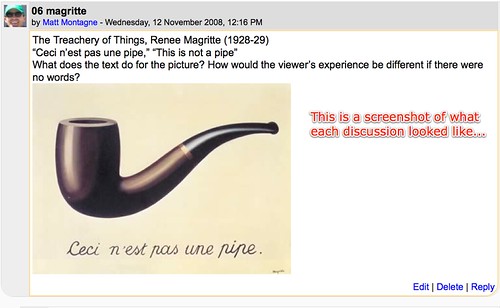
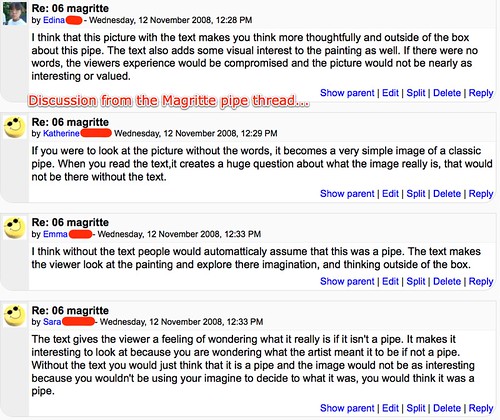
The 8th grade students recently read Persepolis, which is a graphic novel about a young person's experience after the Islamic revolution in Iran. This is the first time that their teacher, Christina Gwin, has used the graphic novel genre in class with her students. After reading the book, she was planning on doing an a discussion activity in the classroom where her students would analyze images related to the book. She was planning on doing this in a traditional discussion format with students responding to images displayed on the projector in the front of the room. Christina was interested in some type of method to actively involve more students in the discussion at the same time. So, Christina decided to use a moodle discussion forum to facilitate a concurrent discussion. We created a forum with 18 different discussion topics for each of the 18 photos that she wanted her learners to evaluate, compare and contrast . Each discussion topic had a photo and a series of unique questions for the learners to respond to. The students were only required to reply to 5-6 of the photos, but they were required to at least look at all of the photos and to skim some of the replies. See the screenshots at the end of this post for more detail about what this looked like in moodle.
This was all done in roughly 45 minutes and here is what I observed (keep in mind that this really was the first time that the students ever used moodle).
1. ALL students contributed to the discussion for the entire time period. They were engaged in a way that is not possible in a traditional classroom discussion where one learner has the floor at a time.
2. A student or two jumped right on facebook when we started. I provided a re-direct and they closed out of facebook and worked on the discussion at hand without further distraction.
3. We had one problem with the lesson and that was time. When the class period came to an end, all of the students were quite busy contributing to the forum. They seemed to have lost track of time. What a nice problem to have!
While the activity went extraordinarily well, the next time we do something like this I think I'd consider modifying the follow up activity. The students had a follow up homework assignment that essentially required them to reflect upon their experience in class that day. Students were told to complete this in a word processor and then print it off and turn it in the next day. I'm thinking that they could've done this via a moodle web form assignment. At a minimum I believe this would've streamlined the process for turning in the follow up assignment to Christina.
Props to Christina for taking the risk with this project as we are both very new to moodle and of course this activity certainly could've flopped on us. But it didn't flop, and in fact it was quite successful and now gives us a broader base of experience from which we can build more powerful learning experiences in the future.
Below are a series of screenshots that show what the assignment looked like in moodle (click the photos for a better view of each):
Screenshot #1:

Screenshot #2:

Screenshot #3:
Screenshot #4:
This was all done in roughly 45 minutes and here is what I observed (keep in mind that this really was the first time that the students ever used moodle).
1. ALL students contributed to the discussion for the entire time period. They were engaged in a way that is not possible in a traditional classroom discussion where one learner has the floor at a time.
2. A student or two jumped right on facebook when we started. I provided a re-direct and they closed out of facebook and worked on the discussion at hand without further distraction.
3. We had one problem with the lesson and that was time. When the class period came to an end, all of the students were quite busy contributing to the forum. They seemed to have lost track of time. What a nice problem to have!
While the activity went extraordinarily well, the next time we do something like this I think I'd consider modifying the follow up activity. The students had a follow up homework assignment that essentially required them to reflect upon their experience in class that day. Students were told to complete this in a word processor and then print it off and turn it in the next day. I'm thinking that they could've done this via a moodle web form assignment. At a minimum I believe this would've streamlined the process for turning in the follow up assignment to Christina.
Props to Christina for taking the risk with this project as we are both very new to moodle and of course this activity certainly could've flopped on us. But it didn't flop, and in fact it was quite successful and now gives us a broader base of experience from which we can build more powerful learning experiences in the future.
Below are a series of screenshots that show what the assignment looked like in moodle (click the photos for a better view of each):
Screenshot #1:
Screenshot #2:
Screenshot #3:
Screenshot #4:
Wednesday, February 06, 2008
Parent Ed - Web 2.0 Study Group Meeting #1 Summary
 Even with a nasty Wisconsin snow storm brewing, we still managed to have four hearty souls join us for this ongoing study group experience for our parents! A few additional parents listened in to the conversation from home via a live ustream broadcast (the broadcast has been archived and is available online).
I was seriously considering postponing due to weather, but as it turned out the drive home really wasn't that bad at all. And I'm glad we didn't cancel, because I enjoyed the conversation that was started last night. We have such a sharp group of folks assembled for this study group experience. While everyone last night shared a different set of goals for their participation, it was clear that everyone is eager to roll up their sleeves and personally engage in this new landscape. During our first class meeting we skyped with Vinnie Vrotny and our partner school for this project, North Shore County Day School, to do a little meet and greet exchange. We also spoke with Lorna Costantini, a parent involvement leader from St. Catherine's Ontario (Canada). Lorna will be working with be learning along with us and it was nice for everyone to have the opportunity to hear from her. As a side note, Lorna and I are looking for parents who are interested in joining us on upcoming editions of a live webcast show, "Parents as Partners." Please contact Lorna or myself if you are interested in joining us on an upcoming show. I'm thrilled to be working with this study group and I'm looking forward to learning and sharing throughout this experience.
At this point it looks like we are tentatively scheduling our next face to face meeting time for Friday, February 29th from 10:00 am - noon at the Mequon library. We hope to have school parent, Anne Reed, join us to talk about how she uses some of these 21st century tools in her career as an attorney. We'll also have a little "lab time" after Anne's talk, so be sure to bring your laptop computer along if you have one. Listen to a recording of Anne on the Lake Effect show from the Fall of 2007 as she talks about jury selection in the 21st century landscape (scroll down and click the media player that says, "Jury Blogging.")
In the event that any parents are reading this from our group, remember that you have two assignments:
#1 - Leave a comment (text comment, audio comment, or a video comment) about your goals for this experience on the voicethread that I started.
#2 - Join the North Shore Country Day online learning community at moodle. Vinnie created a brief screencast that leads you through the process of joining this community. When you are there, be sure to join both the "Growing Up Wired" course and the "Gaining Digital Citizenship" course (the digital citizenship course is from North Shore's study group experience from last year).
Photo courtesy of Thomas Hawk on flickr (photo is licensed in the Creative Commons for non-commercial use)
Subscribe to:
Posts (Atom)