Wednesday, January 30, 2008

Making Daniel Pink Proud!

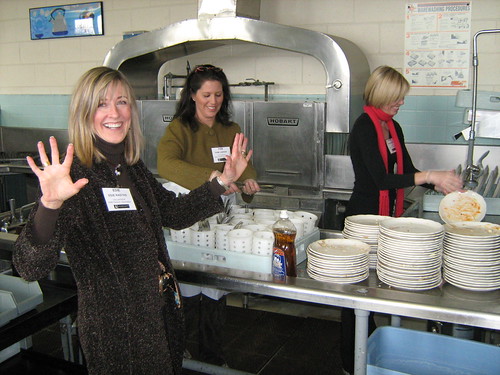
Daniel Pink would've been proud of our in-service day this past Friday! The day started out with an all school team building (faculty, administrators, staff employees) activity facilitated by Chuck Taft. After the school-wide team building we moved into mini-conference mode, with hour long morning and afternoon sessions where we were able to choose from a range of activities. Some of the activities involved heath/fitness/play (eg-volleyball, overview of the work-out facility on campus), some involved team building (cooperative games, team building idea for our school, mental health issues), and some involved curriculum connections (eg-using google earth, using web2.0 tools, drama games, small group curriculum planning, etc). We also had a fantastic lunch hosted by our parents (pictured here you'll see our awesome parents working the dish washing machine!!)

I thought it was a fantastic balance of work in play; I think everyone walked away with a positive experience and an interest in participating in more experiences like this one in the future. The USM Professional Development Committee did a fantastic job of planning this event and pulling it off. I think Daniel Pink would be very proud of the fact that we incorporated health, fitness, community and "play" throughout this day!

Parent Education - Parent Web2.0 Study Group

I'm really looking forward to the first face-to-face meeting for our Middle School parent web2.0 study group this Tuesday, February 5th at 6:30 pm. I think this is going to be a wonderful opportunity for our parents to roll up their sleeves and explore the world of the "Read/Write" web. To quote Will Richardson in his excellent book, Blogs, Wikis, Podcasts, and Other Powerful Web Tools for Classrooms, "There is no better way to understand the impact of the Read/Write Web than becoming part of it." From my pre-service days at the University of Wisconsin-Madison, I've always been a big believer in the concepts of "learn by doing" and constructivist teaching and learning. This learning experience for our parents is going to be highly constructivist with different parents engaging in different ways based upon their unique interests and background knowledge. Over the course of the next few months we'll meet face-to-face, virtually via tools like Wimba, and we'll have asynchronous homework assignments to reflect upon.

Another interesting component of this study group that I'm anticipating is that we are linking up with a similar study group being led by Vinnie Vrotny down at North Shore Country Day in Winnetka, IL. We hope to use Vinnie's Moodle system as the central launching point for our work with everyone carving out their own unique learning path from here.

We're looking for guests to join us to share their experiences in the world of web2.0 tools (either professionally, personally, or both) with our group. Joining us via skype, wimba, etc are all possibilities. Please let me know if you'd be interested in speaking with us and/or sitting in on our sessions.

Tuesday, January 29, 2008

Ustream.tv to the Rescue

What do you get one you mix really bad weather, another canceled Washington DC Trip organizational meeting for the parents, a creative/energetic history teacher, and a little ustream.tv action? You get a live broadcast by US History teacher extraordinaire, Chuck Taft, to the 8th grade parents via ustream.tv. With all after school activities canceled tonight on account of the weather, Chuck was looking for a way to get the information out to the parents. This was the second time this year that the Washington DC overview for the parents had to be canceled due to inclement weather. Chuck decided to send an email out to the parents with a link to the live ustream feed. At 1:45 CST today Chuck began his broadcast and presentation. He shared a little powerpoint and fielded parent questions submitted via the chat from the viewers. Chuck had 20 parents join in the ustream session, which is nearly 25% of our 8th grade parents. He also saved the recording and will post it on his website/blog for parents who were unable to view the broadcast live. Chuck did a great job of making soup out of stones today with his live broadcast! Way to go, Chuck!

Monday, January 28, 2008

One Laptop Per School...Introducing the MacBook Air

I was pretty fired up about MacWorld last week and the possibility of Apple introducing a laptop computer that is student targeted, light weight, possesses excellent battery life, and is rugged and affordable...something less expensive than the MacBook and possibly with a solid state flash drive. I've long been a fan of apple computer, their OS, and of course their glitzy hardware. What they unveiled at MacWorld was light weight and mobile alright, but also came with an $1800 dollar price tag! The only thing more ridiculous than this price tag for the entry level MacBook Air was the price tag for the MacBook Air with a 64 GB solid state hard drive and a ever so slightly faster processor - $3100! Is Apple Computer crazy? Are they out of touch? Who is going to buy a 13" laptop for this price? It looks to me like Apple is on the same path of Microsoft with its proprietary nature, overwhelming growth, and overall unresponsiveness to the needs of the average consumer - this is hard for me to say as I write this from my MacBook Pro.

With a device like this we aren't coming anywhere near one laptop per child possibilities for our kids. As I was talking about this with Doug Symington yesterday via skype, he referred to the Mac Book Air as "The One Laptop Per School!" With prices ranging from $1800-$3100, Doug is right on!

Saturday, January 26, 2008

Steve Jobs on my Blog!!

I loved SNL's iPod spoof from last year...I just viewed their iPhone spoof on Hulu. Going to share this with some of my students who I consider "Apple Buddies." Hilarious!

A caveat...this clip comes from Hulu, which is a beta website. There is a 50/50 chance that this video may not load and play properly.


Thursday, January 24, 2008

Great Video

Check out this awesome video and let me know what your reactions to it are!

Voicethead Podcast Reflection

This is a podcast reflection of my thoughts on using Voicethread over the last few months in with Middle School students and teachers here at USM.


Subscribe Free
Add to my Page

Wednesday, January 23, 2008

Parent Ed Event-Growing Up Online


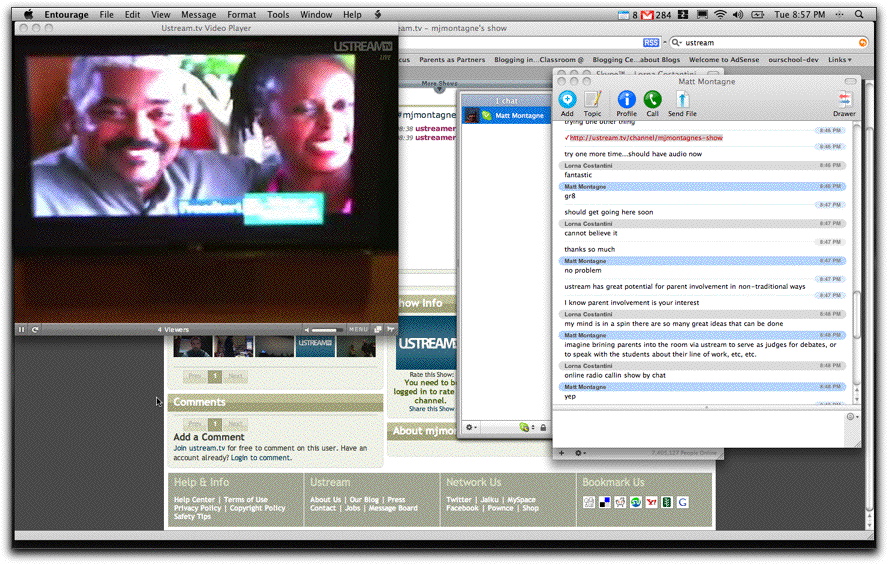
Last night I met three other parents online in a skype chat session to discuss the PBS Frontline special, "Growing Up Online." Two of the parents were from USM (the school I work at) and we were also joined by Lorna Costantini, a parent/parent coordinator from a school in St. Catherines, Ontario. Lorna is someone who I recently met online and we're participating in the Webcast Academy 2.4 class together. I must say that it was nice to be able to think aloud and process this event collaboratively with the other chat participants. I also really enjoyed the experience of watching this alongside three other parents as I'm not a parent myself-it was great to get their perspective and hear their voice on this issue.

I'm amazed at what we've managed to do at USM over the last few months. At the beginning of the year I never would've even thought of conducting a parent education session through a live chat. While this experience wasn't perfect (one of the parents commented that it was difficult to follow the program and chat at the same time-I agree) it certainly opens the doors for some different ways of thinking about parent education with the ultimate goal of including more parents in the conversation.

By the way, this wasn't broadcast in Lorna's area in Ontario so I ustreamed it to her. Included in this post is a screenshot that Lorna took while watching the ustream feed and participating in the chat. It was nice to be able to do this so she could follow along and engage in the conversation live with us.

By the way, if you didn't get to see Growing Up Online last night on TV, it is available for viewing online any time via the PBS website. The Washington Post held a chat on Thursday morning with the producers of the segment. The chat log may be pursed online here (some really interesting questions/answers in the chat).

Tuesday, January 22, 2008

6th Grade Students-Questions for Wesley Fryer

Dear 6th Grade Students:

Special note to 6th graders: Mr. Fryer has already started answering some of our questions. He wrote a blog post on Saturday called, "Digital Citizenship Q/A Video Responses," round 1. He posted two YouTube clips at his site for you to watch. After watching the YouTube vides, feel free to leave Mr. Fryer a kind comment at his blog. I know he would like to hear from you!

Please click the the Comment link below and write your two questions that you have for Mr. Fryer about digital citizenship, online safety, or any other related technology topics. Mr. Fryer is an expert in the area of technology and schools and is looking forward to answering your questions in a live video broadcast in early February. Please read questions that other students are asking prior to leaving your questions. Doing this will help you think of questions. When you post your questions you'll see the option to post using a Nickname. Please use Nickname as an option and write your Protecht username as your nickname.

We will take 5-10 of your questions and make 3-4 short videos to share with Mr. Fryer prior to our video broadcast in early February. Mr. Fryer will be watching your videos prior to the live broadcast. He will then answer the questions when we meet live with him, which we'll try to watch together in Mellowes Hall. Many of the other participating classes will be doing this very same activity. Check the Questions for Wes Fryer page on the Protecht wiki to see questions that other schools will be asking in their videos for Mr. Fryer.

Mr. Fryer has a really neat Blog called Moving at the Speed of Creativity. Surf around his blog to learn more about Mr. Fryer and what he does.

Below you'll find sample questions so you have an idea of what your post should look like:

Mr. Fryer-
I have two questions for you about this topic of online digital citizenship:

1. Is it OK for me to IM with another student that I met while participating in this project?
2. What are some of your favorite online communication tools that you are using right now?

From,
usm14Mattm

Thursday, January 17, 2008

Are we playing a zero sum game?

I just had a conversation with our 8th grade US History teacher this morning, Chuck Taft, about the incredible computer lab scheduling crunch that we continue to experience in our Middle School. Our middle school is made up of students in grades 5-8 with roughly 80 students per grade level. Each grade level has english, social studies, science, composition, literature, fine arts, physical education, foreign language, and a few elective opportunities here and there. Our Middle School has access to the following lab resources at USM: a traditional PC lab with 21 computers, a library with 8 computers, a mobile lab with 20 laptops, a science laptop cart with 10 computers, a middle school iMac studio with 9 computers, and a lab we share with our elementary school that has 20 computers. Chuck and I took a quick glance at our PC lab this morning and it was booked solid all the way until March 18th, our spring break! I suppose this is a good problem to have, but here is my issue...many teachers don't even bother to sign up for the lab because they know it will be booked! How can teachers plan for the spontaneous use of Internet technologies when they don't have spontaneous access? Of course the teachers have a classroom computer and a great deal can be done with that, but this doesn't allow students to actively engage with and create content. Furthermore, I'm getting ready to co-present a session at our in-service day on January 25th on web2.0 technologies and nearly 17 people have signed up for this learning opportunity. How can I, in good faith, put my best foot forward in this session and encourage teachers who are willing and interested to employ some of these tools in their classroom when I know that they won't be able to try things out very easily with their students because the lab is booked solid? If these teachers do dig up so lab time, are they taking time away from other teachers who are regular/semi-regular users of lab resources? Is this a zero sum game? Is a public WiFi system that allows students to bring in their personally owned computing devices the answer? Do we need more mobile labs? Is another lab the answer? HELP!!!