Wednesday, April 23, 2008

Earthcast08 Audio

I just wanted to do a quick post here with links to the raw audio for the Earthcast08 24 Hour Webcastathon that took place on Earth Day. To say that the event was a success would be an understatement. I've said it before and I'll say it again...this project, from start until the end, was the highlight of my school year. I have alot to say about this event and more reflection/thoughts to come later, but here are links to a few of the audio recordings from the day (I highlight the ones below only as a means to provide a simple way for our teachers at my school to quickly access a few of the recordings-ALL of the sessions throughout the day were interesting and I would encourage everyone to check them out). A special shout out goes to Jeff Lebow and the Worldbridges crew for their continuous recording of the stream and subsequent posting to the webcastacademy page.

-Jason Czarnezki, Professor of Environmental Law at Marquette Law School - "A Greener Manifest Destiny"
-Sheila Adams and her middle school students from Rye Junior HS in New Hampshire, USA
-Jason Robertshaw-Ocean Health and Conservation (Sarasota, FL)
-Kip Jacobs and the USM Middle School EAT Students-Student Voices on Earth Day
-Derrall Garrison and his science students giving their presentations on different topics related to conservation and the environment (Cupertino, CA)
-Emma and Kelly from USM talk with Doug Symington about the greening of USM-the last 20 minutes is a really neat audio clip recorded by a college professor in Regina, Canada.
-Drew Buddie, an educator from the UK, talks about sustainability in schools and even talks with a few USM 5th grade students from USM!
-Drew Buddie and his school in the UK discussing sustainability and service learning. Drew actually put me on the call to have a conversation with a few of his colleagues and with an incredibly eloquent young student, Jemma.

There were many, many more hours of interesting content. To listen to all of the audio, please click here. At some point over the next few weeks some industrious souls from the Earthcast08 team will be editing these files down into more coherent audio sections. Until then, enjoy the raw audio!

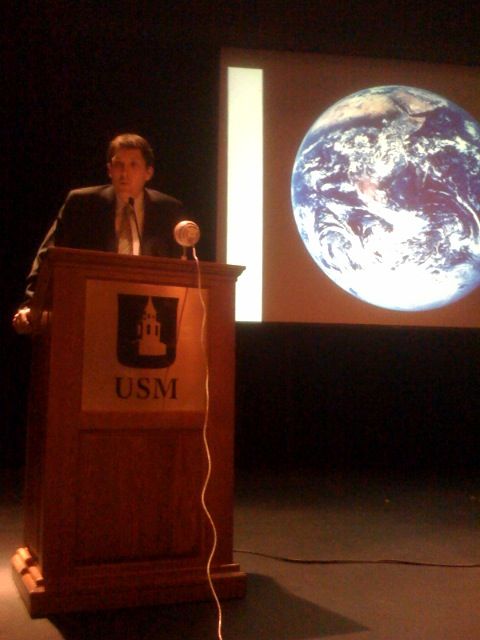
Photo Caption: Professor Jason Czarnezki, professor of environmental law from Marquette University in Milwaukee, WI USA, talks to the Middle School Students at USM on Earth Day 2008 about a "Greener Manifest Destiny."

Saturday, April 19, 2008

Earthcast08 - Only 2 days away!

One of our Earthcast08 team members, Jason Robertshaw, put together this wonderful audio promotion for our 24 Hour Earth Day Webcastathon. Many of the voices that you hear in Jason's audio clip were submitted by Earthcast08 team members over the past few weeks (many team members recorded their students saying "Earthcast, Earthday," and other sound bytes). This is licensed under Creative Commons, so you're free to remix the piece as you would like.


powered by ODEO

Original Audio Source (for downloading and remixing)

Monday, April 14, 2008

Brenna Argall-Robotics Assembly Podcast

Below you'll find the audio from a wonderful talk during our middle school assembly today by former USM student, Brenna Argall. Brenna is currently a PHD candidate at Carnegie Mellon in their robotics program. In her talk she gave us a great overview on the world of robotics.

powered by ODEO

Direct link to audio file

Sunday, April 13, 2008

Listen to Parents as Partners with Steve Hargadon on Monday, April 14th!

Join us live tomorrow night (Monday, April 14th) at 9:00 PM EDT as Parents as Partners is joined by special guest, Steve Hargadon, to discuss web2.0 pedagogies in schools and best practices for educating parents about these tools. You can participate in tomorrow's webcast by listening along and by entering the chatroom at http://edtechtalk.com/live. Please spread the word and encourage parents from your school to join in as well. This is a great parent education opportunity for parents in your school and community!

If you can't join us live for the conversation with Steve, know that this will be archived online as a podcast at the Parents as Partners page on edtechtalk.com (you'll see past episodes posted online as well).

Please take a moment to join our Parents as Partners group on Facebook. You will need a Facebook account to join the group. This Facebook group centers around the theme of supporting students in the 21st century. Encourage other school parents to join as well!

Hope to "see" you online tomorrow for the Parents as Partners webcast!

*Photo courtesy of Leonid Mamchenkov on flickr (Creative Commons)

School-Wide Web2.0 Platform for the 2008-2009 School Year

It has been an amazing past couple of years in my role as a middle school technology coordinator. Our pockets of web2.0 use are starting to expand amongst our teachers, our parents are gaining in familiarity with the tools, we have administrative support, and we're preparing for an in-house mini-conference day on "21st Century Learning" with Alan November in October of 2008.

As we start to expand our use of these tools, it is becoming important that we have some coordination in the tools/platforms that we're using. With only a few teachers using blogs, wikis, etc with students, it hasn't been so important to choose platforms or make decisions on how student accounts should be created. But now we're at the point where we want the students to keep their digital profile with them from year to year. As a result, we're going to pick a handful of tools that we'll be using at the discretion of our grade 5-8 teachers (eg-some teachers will NOT be using these tools next year, and this is perfectly fine. But if they do decide to use them, then we have a fairly powerful and consistent toolkit to choose from).

Our toolkit for the 2008-2009 school year at this point is looking like the following:

Student Blogging Platform-In the middle school we'll be going with the eduBlogs Campus product. While it isn't cheap at $2000 USD for our middle school, it also requires zero in-house IT support to setup, configure, maintain, etc. I looked at several possible solutions this year, and it just seems like eduBlogs Campus makes the most sense. It has tremendous flexibility and controls-some blogs can be set to private and some to public very easily (we'll probably have our 5th grade blogs set to private for starters while our 7th and 8th grade blogs most likely will be publicly visible). This will give us the opportunity to give every middle school student their own personal blog space that they can use in all of their classes and that they can use from grade to grade. This tool will also be a great resource to use for our students to post their podcasts, videos, pictures and other like media.

Educational Voicethread-Our teachers really have done some great things with this tool over the past year. Unfortunately, the management of it has been a little tricky. All students in grades 7 and 8 have their own regular voicethread accounts, but they are limited to a maximum of three voicethread projects. Ed.Voicethread, which will cost around $600 annually, will allow our students to create as many voicethread projects as they'd like, and they'll be able to maintain their account from year to year which will serve as a kind of digital learning trail/portfolio.

Wikispaces-We've been using this tool for the past two years and we couldn't be happier. We don't pay for this service, but we do have our students create accounts and many of our teachers have their free educator service. We definitely need to standardize on the way we create accounts for students, because now the scheme isn't too consistent from grade to grade (which of course creates some confusion!)

Googe Aps School Edition-We got this up and running at the start of the school year for all of our middle school students and this has been quite successful. Many students haven't used it as they're so accustomed to using MS Word, but the upside for those who have made regular use of Google Docs has been extremely positive. We're going to really push all of our students toward making use of their school branded Google Docs accounts next year.

That is pretty much the web2.0 suite of apps that we'll be standardizing on with our students next year. Of course there are dozens of other apps that will be used along the way, but these are the web2.0 tools we'll be offering in grades 5-8.

Am I missing anything? How does this compare to the web2.0 platforms that your school is using? What do you think about this strategy?

Saturday, April 12, 2008

Tweet Cloud

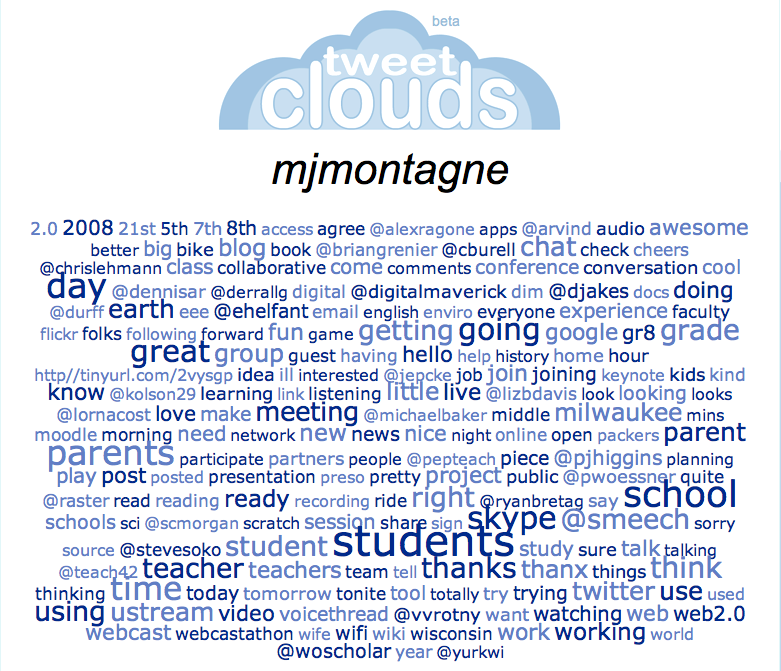
Twitter has clearly been one of the most important tools that I've used this year in my professional development. I began using twitter in October of 2007 and below you'll find a screenshot of my latest "Tweet Cloud," which is a visual representation of the most often used words in my twitter posts. In a way, this provides a glimpse into the kinds of things I've been up to this year in my role as a digital media teacher and a middle school instructional technology coordinator. At the beginning of the year it was a goal of mine to really focus my attention on students. If this tweet cloud counts for anything at all, I think that I've done a pretty good job at putting the interests of students at the forefront of what I do. There are many other ways that I've been analyzing my tweetcloud, but I'm also glad to see the twitter names of so many people that I've met and exchanged ideas with over the course of the year. I consider this to be one of my best years professionally, and I attribute this largely to the educators I've met all over the world via twitter and other social media tools.

Thursday, April 10, 2008

A Google Docs Success Story!

The 5th grade students were in the iMac Studio doing some work this morning on their digital stories that they're creating from their personal narrative composition. They're basically taking their traditionally written personal narratives and boiling the pieces down so the recording in their digital story lasts about 2 minutes.

Anyway, this morning a student opened up his narrative that he wrote in google docs, but all of his text was missing. Many times the students will copy>paste from google docs into Word because they don't know how to print from google docs without the url information appearing on the header/footer of the page. In this boy's case, he did a cut>paste from google docs into Word, so his text was missing because he did a "cut." So this student was pretty bummed when he called me over to show me what was going on. We took a minute to take a look at all of the revision histories that were available to revert to, and he thought this was pretty neat. We reverted to the correct version and the student was able to continue on his way without a hitch.

The tracking of revision history is yet another reason for students and teachers to make use of this powerful word processing platform.

Friday, April 04, 2008

Would you let your child(ren) spend as much time on the computer as you spend on it?

This was a twitterpoll sent out this morning by Brian Grenier, and my initial response was as follows:
Gr8 question-this is my point to teachers who want to block/limit student access during the school day
To which Brian replied,
I'm missing the point, can you elaborate?
To which I replied,
ahh, the limitations of 140 characters...I'll elaborate on my blog or some other public space and send to you
Twitter can definitely be a source of confusion when getting involved in back and forth discussions. Many times we lose the meaning in emails, which aren't bound by a 140 character restriction. So twitter can definitely be problemmatic in discussions.

I'll attempt to clarify my thinking (I can't promise that I'll do a very good job of it here either!!)

Brian's initial question in twitter, "Would you let your child(ren) spend as much time on the computer as you spend on it?" simply triggered something that I've been thinking for quite some time now.

Imagine if adults were forced to work with mostly analogue tools and limited access to digital tools during the work day much like students are required to do during their work day. Now imagine those adults going home and having better access to digital resources and connectivity to digital resources than they do during the work day (much like many of our students).

Why don't students have connectivity during the school day? Why should they mostly be limited to analogue tools with occasional computer lab access? Imagine if adults were forced to work with analogue tools all day with periodic access to digital resources in some centralized computer lab environment in their work place.

Anyway, this is somewhat tangential to Brian's original question, and my analogy might be somewhat flawed, but I believe students should have solid access to digital resources in the 21st century just like they had solid access to anaglogue resources in the 20th century.

Karl Fisch wrote a wonderful post on, "Why Wireless," which discusses the value of a publicly accessible WiFi node on his campus.

Over-and-out...

Student Scratch Project

A student that I work with in my 7th grade programming class created the following Scratch project. He is really into music and I think he enjoyed the process of putting this together. It is important to note that he did this entirely on his own and outside of our class (that is the great thing about the Scratch program-it is a free download/install and students can put it on their own personal computers quite easily).

As a side note, I'm interested in working with other teachers and schools to try to group students together to collaborate on Scratch projects/challenges with one another. I think this would be an authentic way for students to engage in collaborating across great distances on computer science coding. Let me know if you might be interested in working on such an endeavor.

Click the image below to see view and listen to the project!


Scratch Project